
Introduction
PowerPoint is a complete presentation graphics package. It gives you everything you need to produce a professional-looking presentation. PowerPoint offers word processing, outlining, drawing, graphing, and presentation management tools- all designed to be easy to use and learn.
This is a generic lesson on how to create a Power Point presentation, with a few "extras." Power Point is a powerful tool and can do many things, but this is to show the basics of Power Point.

Many people are scared to touch a computer. This webquest has easy steps to follow and very picturesque tutorials to go with it.
Task
When you are finished completing this Webquest, you will know how to create a basic Power Point presentation. You will have enough knowledge to be able to add clipart, word art and text boxes. You will also be able to add animation to the text and slides of the presentation.

Process
This is where you will learn actually how to add slides to your presentation and also how to add a couple of "bells and whistles." The links below teach you how to add/delete slides and how to insert Word Art and Text Boxes within your presentation. You will either need to download or "open" them after you click on the link. Try not to worry right now if you don't fully understand right now, the tutorials will help you.
Creating/adding slides to your presentation
How to use text boxes within the presentation
How to use Word art within the presentation

- Now that you have been shown how to use Power Point, and maybe some "extras," try actually creating your own slide presentation. The topic you choose is of your choice. You could make a presentation on a biography of someone, how to do a math problem, how to make your bed, or even directions on how to get somewhere; it's up to you. Try to make it about something you like to do or have a lot of interest in.
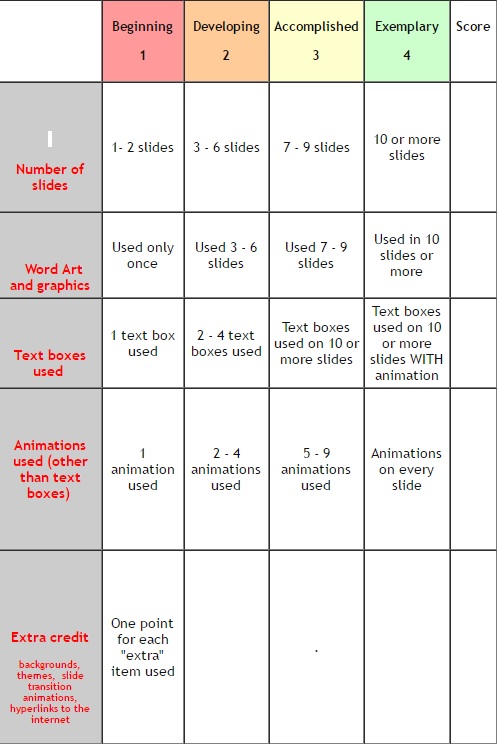
- The length of your presentation can be as long as you like as long as it is 10 slides or more.
- Each slide must contain
- Word Art
- Animation of text
- Text boxes
- Graphics
You could help your grade if you put any "extras" in your presentation as in:
- Having page backgrounds, or themes for the slides
- Animation for slide transitions or any kind of sounds
- Hyperlinks to the internet or some other page on the computer
Evaluation
EVALUATION
Conclusion

Now that you have finished the webquest, I hope you have learned something new. You can do so many things with power point. Instead of making a boring letter or or a multipage document, use power point and spice your document up with a lot of slides and animations. Use it to also make a picture slide of your family and friends.

Credits
This webquest was created by HAKKI BURAK BAKIRCI
RESOURCES
http://homepage.cs.uri.edu/tutorials/csc101/powerpoint/power.html