
Introduction
As you walk to school 
or ride the bus 
or ride in your parent/guardian 
car, you may wonder how do all of the plants that you see grow so tall and beautiful

Did you know that you can make a plant grow as tall and
beautiful like all of the plants that you see everyday?
Find your parent/guardian! Quick! 
You both will learn about plants and how to grow your own plant. Have lots of fun!

Task

By the end of the webquest, you will be able to:
-
define what plants are
-
identify and list what all plants need to live
-
identify and describe the parts of a plant
-
demonstrate the steps to growing your own plant
Read this poem first before you move to the process.

Process
Step 1: Once you have found your parent/guardian, find a quiet spot. Have you done this?
Good. Go to step 2.
Step 2: Let's learn about what a plant is.
Plants are trees, grass and flowers. Plants grow from a seed. A seed is the small, hard part of
a plant from which a plant grows. Not all plants grow from the same seeds. Seeds come in all
kinds of shapes, sizes and colours.

The Bahamas National Tree is the Lignum Vitae, and The Bahamas National Flower is the
Yellow Elder. These are examples of plants that grow from a seed.
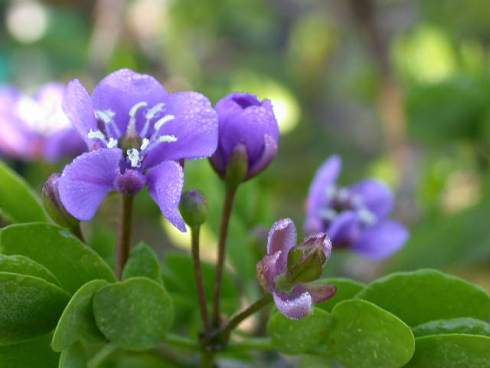
Lignum Vitae Tree
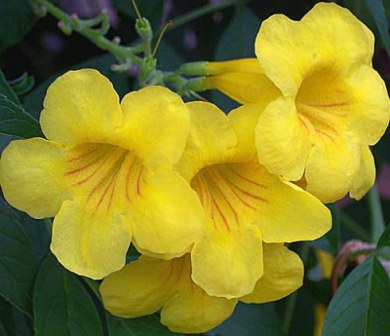
Yellow Elder Flower
Plants are very important. Plants get light from the sun to make their own food so that we can
have food to eat and so that animals can eat.The light the plant gets from the sun gives the
plant energy. This is how plants can make food.
Step 4: Let's learn about what things plants need to live. Click on the video below.
Step 5: Let's learn about the parts of a plant. Click on the video below.
Vocabulary Word:
Reproduce: plants make more than one flower/fruit.
Step 6: Now it's time to learn about how to grow your own plant.
There are many kinds of plants that you can grow such as pumpkins, carrots, watermelon,
peas, beans, sunflower, potatoes and tomatoes. Choose a plant seed that you would like to
make, then go to SuperValue or Modernistic Garden and Pet Supply to get your plant seeds.
Vocabulary Word:
Bud: a small part that grows on a plant and then it grows into a flower, leaf, or new branch.
These are the materials you will need:
- plastic cup
- seeds
- water spray bottle
- tissue
- camera
- flowering pot with soil
Directions:
a. Place 2-4 seeds in a plastic cup, then fill the cup with a little water until the seeds are
covered. Place a tissue over the cup and then leave the plastic cup overnight.
b. Drain the water out of the plastic cup leaving the seeds in the cup, then fold the tissue and
place it at the bottom of the cup covering the seeds.
c. Use the spray bottle and spray a little water on the tissue, then place the tissue over
the seeds.
d. Put the plastic cup in an area where there is a lot of sunlight.
e. In 3 days, check the seeds to see if there is any bud and take a picture if there is. Check to see if
the tissue is dry. If it is use the spray bottle and sprinkle a little water on the tissue.
f. When the plant gets an inch tall, place it in a flowering pot with soil.
g. Place the plant in the area again where there is a lot of sunlight.
h. Now watch your plant grow. Don't forget to take pictures of the plant growth.
Evaluation
Now that you have learned all about plants, you will now need to be graded. Look at the table below to see how you will be graded. Place 1, 2, 3, 4 on the line next to each question.
The possible highest score is 48 .
1 point |
2 points |
3 points |
4 points |
Answer is correct but there is no support, OR the answer is incorrect but there is some support |
Answer is correct and there is some support. |
Answer is correct and the support is developed. |
Answer is correct and the support is fully developed. |
1. _______How many parts of a plant are there? Name the parts.
2. _______What is a plant?
3. _______Plants need water to grow. What do you think will happen if
the plant does not get water?
4. _______What do you think will happen if plants did not exist?
5.________What problems did you have in growing your plant?
How did you fix the problem?
6.________State two ways plants help people and the environment.
7.________The name of the Bahamas National Flower is the Red Rose.
True or False?
8. ________There is only one type of seed. True or False?
9. ________The roots takes in water. True or False?
10. _______The plant life cycle always starts with a flower.
True or False?
11.________The light the plant gets from the sun gives the plant energy.
True or False?
12.________Big and small plants are important to our environment.
Explain why.
Conclusion


You have now reached the end of the WebQuest! I hope that you had fun learning
about plants. I know that you can now go and grow any plant that you want to.
You can now define what plants are, identify and list what all plants need to live,
identify and describe the parts of a plant and demonstrate the steps to growing your
own plant. Remember to go and share what you have learned to your family and
friends and tell them to visit this WebQuest!
Thank you for your participation and please let me know anything
that you wish you could have seen in this WebQuest.

Credits
These following websites below helped to make this WebQuest a success.
https://www.bahamas.gov.bs/wps/portal/public
https://chadrocco.deviantart.com/art/Dance-Like-A-Tree-83450162
https://www.collinsdictionary.com/dictionary/english/seed
http://www.funashore.com/nassau-bahamas/
https://giphy.com/gifs/nickelodeon-cartoons-nicktoons-harvey-beaks-3o7qE7iHUUPHfV7xQI
https://www.hpsd.k12.pa.us/images/images/back_to_school/?C=S;O=D
https://kidsbiology.com/biology-basics/plants
http://www.makemegenius.com/science-videos/grade_2/uses-of-plants-for-kids
https://www.merriam-webster.com/dictionary/bud
https://modernfarmer.com/2013/07/5-public-libraries-that-have-gone-to-seed-libraries/
http://onestopteachershop.com/2015/08/writing_about_math_constructed_response.html
http://photobucket.com/images/driving%20animated
https://www.pinterest.com/pin/446982331746544101/
http://www.thirteen.org/edonline/concept2class/webquests/index_sub5.html
Teacher Page
8 Fun Facts about a WebQuest!
1.What are the benefits of WebQuests?
The benefits of a WebQuest are that:
- Tomorrow's workers will need to be able to work in teams.
- Individuals will move through several careers in the course of a lifetime.
- The issues facing citizens will become more and more complex, and societal problems will resist easy fixes or black-and-white categorization.
- The amount of information available to everyone will grow at an accelerating pace; much of it will come directly from a growing number of sources without filtering or verification.
2.How did WebQuests start?
Dr. Bernie Dodge, professor of educational technology at San Diego State University, developed and named the concept while teaching a class for preservice teachers in the spring of 1995. He wanted to give his student teachers a format for online lessons that would make the best use of student time while fostering higher-level thinking skills.
3.How have they developed since they became popular?
Dr. Dodge wrote a paper on the topic, "Some Thoughts About WebQuests". The paper was widely read, and many teachers started to adopt the technique.
Soon, staff developers at schools and teacher educators at universities were using the WebQuest Page as a source of training materials and ideas for their own courses. As the WebQuest Page grew, it developed links to WebQuests created all over the English-speaking world.
4. What are the essential parts of a WebQuest?
There are six essential parts of a WebQuest. These are the introduction, task, process, resources, evaluation and conclusion.
Introduction: the introduction section provides background information and motivational scenarios like giving students roles to play: "You are an underwater research scientist". The goal of the introduction is to make the activity desirable and fun for students.
Task: the task is a formal description of what students will have accomplished by the end of the WebQuest. First, the teacher finds resources for a particular topic on the Web. Then, the teacher devises an activity for the students that incorporates the information from the various sites. This task should be doable and interesting. The task is a formal description of what students will have to accomplished by the end of the WebQuest.
Resources: this section of the WebQuest consists of a list of the resources (bookmarked Web sites, print resources, etc.) that your students will need to complete the task. In older WebQuests, you'll find the resources listed in a section of their own. More recent WebQuests have the resources embedded within the Process section, to be accessed at the appropriate time. It's important to remember that non-Web resources can also be used.
Process: this is a description of the steps learners should go through in accomplishing the task, with links embedded in each step.
Evaluation: this section of the WebQuest consists of a list of the resources (bookmarked Web sites, print resources, etc.) that your students will need to complete the task.
Conclusion: each WebQuest needs a rubric 1 for evaluating students' work. The standards should be fair, clear, consistent, and specific to the tasks set. Many of the theories of assessment, standards and constructivism apply to WebQuests: clear goals, matching assessments to specific tasks, and involving the learners in the process of evaluation are all concepts from earlier workshops that apply here.
5.What kinds of topics lend themselves to WebQuests?
While WebQuests can be applied to a wide range of topics, they aren't equally appropriate for everything. You wouldn't use a WebQuest to teach the times table, the chemical symbols in the top two lines of the periodic table, or the state flags of New England. In other words, don't use WebQuests to teach factual pieces of information.
6.What do I need to create a WebQuest?
Once designed and set up, a WebQuest is really just a Web page in a particular format. A Web editor is the only specialized equipment needed to get started, and that's no harder to use than a word processor. In fact, most new word processors even allow you to save your work in HTML form, which is the basic language for designing Web pages.
Ordinarily, you'll also need to have a Web server 1 available to post 2 your WebQuest. Most school districts and many individual school sites have servers available for teachers. However, a server is not an absolutely critical requirement. If you don't have server space, you can copy your WebQuest onto the hard drive of each of your students' computers. Then, run the WebQuest on a browser like Netscape or Internet Explorer.
7.What are some critical perspectives?
Finding the time is the biggest obstacle to designing your own WebQuests. Your first attempt requires that you learn to use some new tools, and some teachers simply can not find enough spare hours to pull it off. The benefit, though, is that once you have made your WebQuest, most of your work is done. Once that occurs, you no longer have to worry about daily lesson plans or scintillating lectures. Relieved of the burden of being the main source of new information, you instead work with your students as a coach, thinking on your feet. Many teachers find that they like this role better than being the "sage on center stage.
WebQuests also require that students have a certain level of reading ability, unless one is careful to find highly visual sites or has an adult available who is willing to read the screens to the students. This means it's harder to create a good WebQuest for children younger than the third grade or for those with language or reading difficulties. Again, these limitations can be overcome by paying special attention in your design of group work, but it is a harder fit.
You should also be prepared for those who feel that classroom learning should be focused on facts and content -- and who oppose inquiry-based learning more generally. They may deride WebQuests as "fluff," since they emphasize critical-thinking skills rather than particular information.
8. How can I use WebQuests in conjunction with other educational techniques?
WebQuests are based on the ideas of inquiry and constructivism. WebQuests also incorporate cooperative and collaborative learning, since students work on projects in groups. These concepts can play a role in teaching with WebQuests.
WebQuests can also help students meet standards focused on critical-thinking and analysis skills, and may be particularly useful for social studies and science. By using multimedia, WebQuests also help with multiple intelligence work. Alternative kinds of assessment can be used to judge the results of WebQuest projects. And, obviously, WebQuests are one way to use the Internet in education. WebQuests are tools, not educational theories, so they can be used in virtually any classroom with appropriate computer access.