
Introduction
welcome
We willl be looking at CAT , the main focus will be at grade 10 .We will cover the following
- word document
- borders and shading
- merging cells
- increase and decrease height
after that a task we be uploaded for the grade 10 class to complete.
What is Microsoft Word software?
Microsoft Word is part of the Microsoft Office suite and is a word processing tool that allows you to create customized documents. The software comes with a number of tools that enable users to produce a variety of written documents.
Microsoft Word Tutorial - YouTube
https://www.youtube.com/watch?v=Cw6a3b5QoAs
Please follow the link to get a brief introduction to Microsoft Word.
Task
On the table below answer the questions that follows.
| INSTITUTION | DEPARTMENT | NUMBER OF ATTENDEES |
|---|---|---|
| Bay Academy | Commerce | 32 |
| NMMU | Hospitality | 39 |
| Debonair college | Business | 22 |
| Golden Dynamics | Education | 44 |
| Stokes Agency | marketing | 33 |
Your table must be designed as follows:
|
2.2.1 |
Apply a heading 2 style to the heading ‘Number of attendance ‘ |
(1) |
|
2.2.2 |
Apply a paragraph spacing of 12pts after the heading ‘Number of attendance’ |
(2) |
|
2.2.3 |
Row 1 and 2 must be shaded with different colours for each row |
(2) |
|
2.2.4 |
Change the school heading in the first row to a red font of size 28pt |
(2) |
|
2.2.5 |
Merge all cells in row 1 and change the row height to 2 cm |
(2) |
|
2..2.6 |
Change row 2 height to 1.5cm |
(2) |
|
2.2.7 |
Set the height of all other cells in the table to 1cm |
(2) |
|
2.2.8 |
Apply a double line 1.5pt outside table border |
(3) |
|
2.2.9 |
Centre the headings in row 2 horizontally in their cells |
(1) |
|
2.2.10 |
Centre the numbers in the last column vertically and horizontally in their cells |
(1) |
|
2.2.11 |
Use a formula to calculate the total number of attendees in the highlighted cell |
(2) |
Total Marks =20
Process
First thing to do
- read introduction on what will be covered
- consult the grade 10 CAT textbook
- look at the active done in class
- click on the link and watch the video
Secondly
- Revise the content
- Ask question on the things that you are unclear about.
Thirdly
- complete the task
- make sure that you save your work
- save your work as follows Surname_Initial_Year
Fourthly
- Submit your Ms Word File ,Saved as your surname and initial .Under Content on Computer application link .
- You will recieve marks immediately after submission
Lastly
- Feedback and explanation of the task will be uploaded after everyone has been marked.
Evaluation
- Most importantly in the evaluation we will look at did the learner apply the styles required in each question .
- Did the learner follow the instruction and apply all changes as per question .
- Look at the marks also when grading the learner so as to grade the learner .
- Grade the learner as per memo and with computers it is so easy to grade the learner as after submission the learner will be marked automatically and for some questions immediately .
- Marks will be graded as per mark allocation per question
Conclusion
- Paragraph styles are the most important styles. They're called paragraph styles because when you use a paragraph style, Word can format a whole paragraph of text at a time.
- Character styles are used to format a few characters within a paragraph .
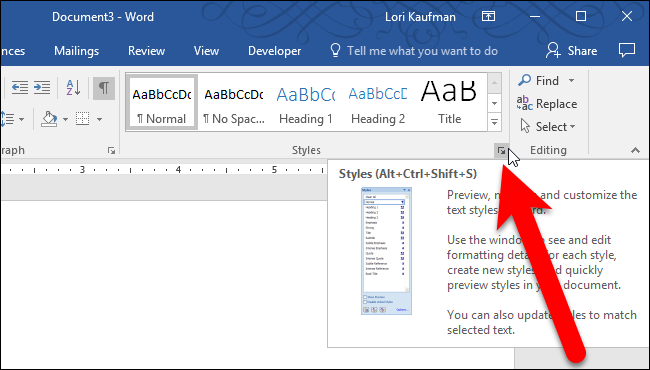
also with other content it is very important to know where to go on the taskbar when you are required to do a certain change in a document such as changing height and shading.

all these are things that you need to take note of when dealing with this chapter for term two .We covered all that is required for a grade 10 learner in this term.
Credits
Teacher Page
this topic was chosen for the grade 10 class because Microsoft word is the first topic to be covered in grade 10 and it is very important for learners to start in word so as to get the basics of how to use Computers and how to do required things using a computer .
In our days using and access to a computer is very significant because we need to understand how to use and operate computers. We encourage learners to be computer literate by focusing and be curious about knowing how to use computers and encourage their peers to be computer literate and be digitally alert.