
Introduction
In today's world, technology is literally everywhere, and people adapt to it in their daily lives. Since the beginning of the 21st century, the world has seen significant technological advancement. The emergence of smartphones, the internet, computers, social media, websites, and so on has paved the way for the development of digital tools that will enhance the practice in the education for teaching-learning process. Now, in education, there are more digital tools that are being adopted and have become the most important tools to help teachers and students improve their communication, collaboration, and creativity skills in order to complete a task.
Digital Tools
Digital tools are programs, websites, or online resources that can make tasks easier to complete. A lot of these can be accessed in web browsers without needing to be downloaded, and you can access them both at home and in work. Digital tools like websites, apps, and extensions, in conjunction with dynamic activities, create the ideal online learning experience.
Source: https://engage.dhsc.gov.uk/digitalpassport/tools/

Source:https://www.thetechedvocate.org/must-blended-learning-apps-tools-resources/
Advantage and Benefits of Digital Tools
Digital tools have important advantages for making processes more consistent, secure, efficient, and effective. As institutions support staff and students across a broader range of geographies with a broader set of needs, the case for digital solutions only grows ( Izzo, Lenny, 2021). Digital tools in education are more collaborative, providing better context, a broader perspective, and more engaging activities than traditional education methods. There are numerous digital tools available for educational use. We may come across a variety of it while browsing the internet which is extremely beneficial to both teachers and students. Teachers use digital tools to improve learning experiences, save time, securely connect learning to student needs, track student performance, provide clarity into the learning process, and much more. For learners it allows them to better connect with the learning material. According to the website of School of Education Online Programs in the study entitled “ How Important Is Technology in Education? Benefits, Challenges, and Impact on Students”, the effective use of digital learning tools in classrooms can increase student engagement, help teachers improve their lesson plans, and facilitate personalized learning. It also helps students build essential 21st-century skills.
Task
By the end of this module the students should be able to:
- Understand the use of digital tools and their benefits in the teaching and learning process.
- Recognized the various functions and features of the categories of digital tools.
- Explore the use of various categories of digital tools, as well as their functions and features.
- Create and develop your own learning by using the different categories of digital tools given in this lesson.
Process
Categories of Digital Tools with their Functions and Features
The scope of digital tools in technology is broad, which is why it has a set of categories that will support in organizing, innovating, and managing the teaching and learning process. Online Bibliography and Citation Tools, Photo and Image Editing Tools, Survey, Polls and Quizzes Tools, Web Conferencing Tools, Stock Photo Sites, Video Tools, Testing and Quizzes Tools, and PDF Tools are the eight categories of digital tools.
1. Online Bibliography and Citation Tools
A bibliography is a list of all of the sources you have used (whether referenced or not) in the process of researching your work. In general, a bibliography should include the authors' names. ... the names and locations of the companies that published your copies of the sources. the dates your copies were published.
Two free and available tools of Online Bibliography and Citation Tools
-
BibMe

Source: https://vectorlogoseek.com/wp-content/uploads/2019/09/bibme-a-chegg-service-vector-logo.png
One of the most functional free online bibliography and citation tools on the Internet. All the features an eLearning content developer needs are there ( Pappas, Christopher, 2013). These digital tools checked for grammar errors, missing punctuation, unintentional plagiarism, and more!
-
4 Citation Styles - Whether you are using MLA, APA, Turabian or Chicago, BibMe can help you reference your work effectively.
-
Variety Of Sources - Journals, websites, books and many other sources covering both digital and print format.
-
Plagiarism Checker - Check your content for plagiarism against plenty of sources on the Internet to avoid using somebody else’s words.
BibMe™ is an automatic citation creator that supports MLA, APA, and Chicago formatting. Other styles are powered by Citation Style Language.
The history of BibMe
BibMe™ started in January 2007 as a student project in the Information Systems department of Carnegie Mellon University. After a semester of development, bibme.org went live in May 2007. The website caught the attention of students and educators alike, finding uses in the classroom setting. Our final year at school was spent improving and enhancing BibMe™. Although we have since graduated, we have continued updating BibMe™ to make it your comprehensive source for all citation services. BibMe™ has come a long way since its inception as an academic project, but we never forget about the students using our service and we are committed to keeping BibMe's ™ core functionality free.
Features
-
Free Version Available - Most of the features are available in the free version.
-
Improving sentence structure, punctuation, writing style, and grammar with our suggestions.
-
Check for missing citations and unintentional plagiarism.
-
Add accurate citations and a bibliography directly to your paper.
-
Create accurate citations for multiple styles and source types.
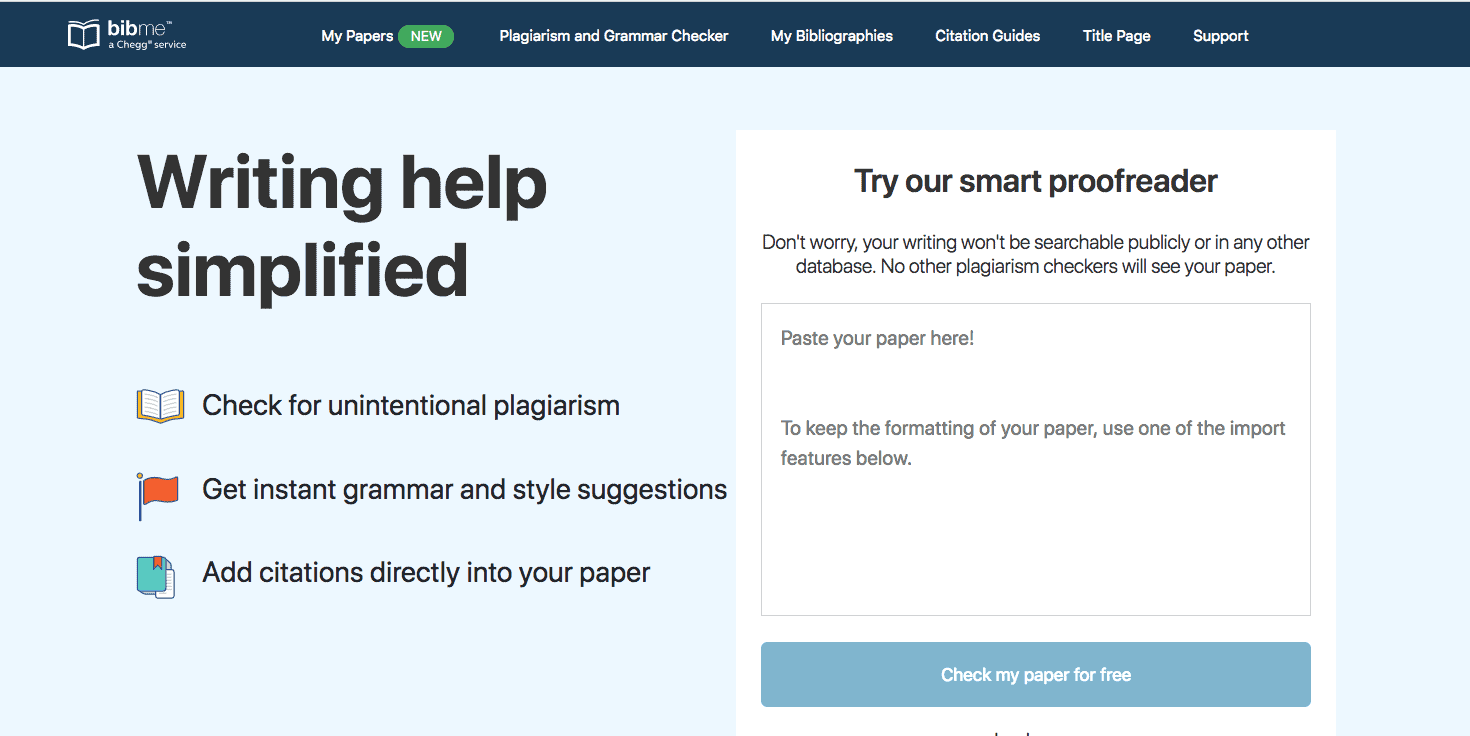
Source: https://www.bibme.org/wp-content/uploads/2019/08/Screen-Shot-2018-03-12-at-1.26.39-PM.png
Our grammar check evaluates spelling, punctuation, writing style, verb tense, sentence structure, and more. In fact, it is capable of checking for 1600+ grammatical rules!
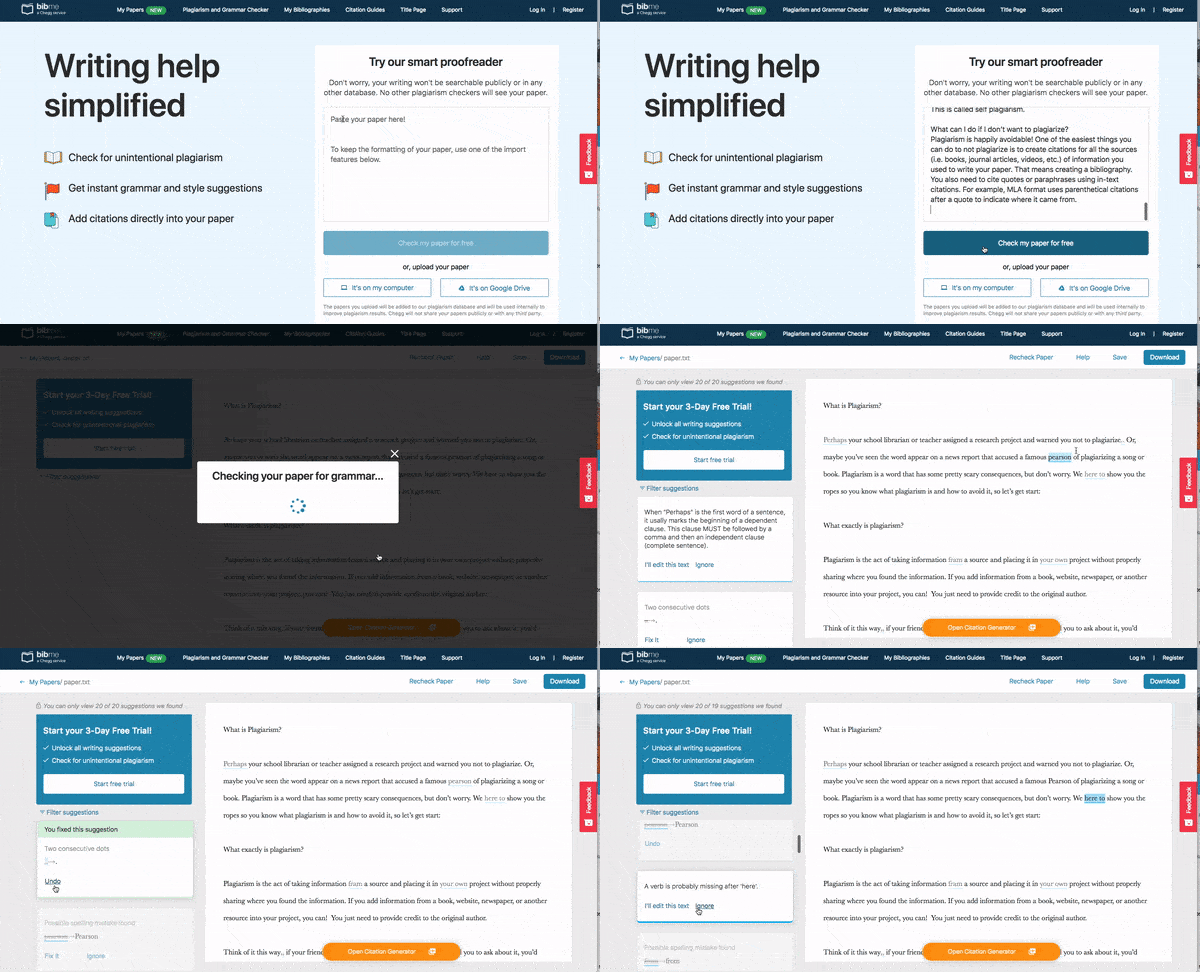
Source: https://www.bibme.org/wp-content/uploads/2019/08/BM_grammar-and-plagiarism-chekcer.gif
BibMe Plus’s plagiarism check is included in that subscription. It scans your paper and helps to flag for any missed or inaccurate citations.
Website : https://www.bibme.org/
-
Citefast

Source: https://www.citefast.com/images/logo1.png
While having a relatively simplistic interface, this platform offers all the major functions of a good free online bibliography and citation tool. ( Pappas, Christopher. 2013)
-
3 Citation Styles - APA, MLA and Chicago to cover all your basic reference needs as well as an in-text citation generator.
-
Good Variety Of Sources - Webpages, books, journals, newspapers and online videos along with many other digital and print sources.
-
Style Guides For All 3 Citation Styles - Comprehensive list of style tips for APA, MLA and Chicago.
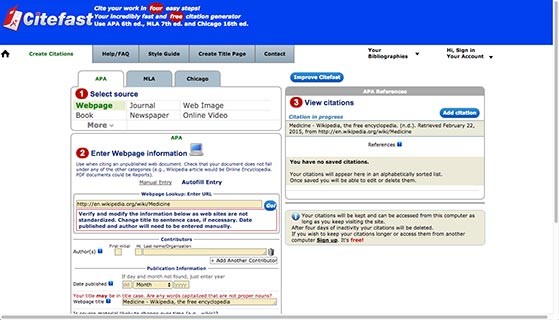
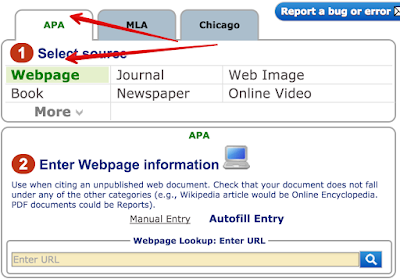
Cite fast is an easy to use web tool for creating citations. Students can utilize it to generate citations in different formats: APA (6th edition), MAL (7th edition), or Chicago (16th edition). The site provides a wide variety of features citation creation super easy and all for free. Some of these features include: automatic look up of journals, books and webpages; easy cut and paste and exporting to MS Word; In-text citation generator with guide and many more ( Educatorstechnology. 2015).
The history of Citefast
While at university studying Computer Science, Alan Cole noticed how creating citations was slow and error prone. He decided to design and program a citation generator that could help students with their citations and in 2008 Citefast was born. Originally it was designed and programmed solely by Alan Cole. Within a few years, the traffic on the website had grown to a significant size. Alan started working on the website full time. He also recruited his mother Lucy Cole, a web programmer to help with the development of the site. New features such as website lookup, book lookup, journal lookup, footnotes, account creation (with multiple bibliographies), bibliography management were added to the site. Over a decade old, Citefast is visited by millions of students/professionals every year.
Features
-
Automatic lookup of journals, books and webpages
-
Easy cut and paste and export to MS Word
-
Ability to change at any time from APA to MLA or Chicago
-
Citations are kept and can be accessed from this computer as long as you keep visiting the site. After four days of inactivity citations will be deleted.
-
Free Account Sign up: Create an account and your citations can be accessed from any computer. Create multiple bibliographies. Your existing citations will be brought into your account.
-
In-text citation generator with guide • Title page generator • Style Guide
-
Supports APA 6th edition, MLA 8th edition and Chicago 16th edition.
Source: https://edshelf.com/wp-content/uploads/screenshot-citefast-2-559x320.jpg https://4.bp.blogspot.com/-J6ktO0XGFSU/VaQPYzphxoI/AAAAAAAAwIE/7-gtG8WhcLw/s400/1.png
Website: https://www.citefast.com/
2. Photo and Image Editing Tools
It is now easier than ever for teachers and students to take and find images in the browser. Most photos and images require quick resizing tools and edits to make them more suitable for use. The majority of these online image editing tools allow us to flip, crop, rotate, adjust brightness, contrast, saturation, and color, touch up, and add filters to photos.
Two free and available tools of Photo and Image Editing Tools
- Pixlr
Source: https://snapseed.online/wp-content/uploads/2019/06/pixlr.jpg
Pixlr is a cloud-based set of image tools and utilities, including a number of photo editors and a photo-sharing service. The suite was intended for non-professionals, however, the apps range from simple to advanced photo editing. The platform can be used on desktops and also smartphones and tablets via mobile applications. Pixlr is compatible with various image formats such as JPEG, PNG, WEBP, GIF, PSD (photoshop image), and PXZ (native Pixlr document format). In 2013, Time listed Pixlr as one of the top 50 websites of the year. Pixlr the Online Photo Editor that lets you edit photos and create great designs right in your browser for Free. Experience next-level, intuitive photo editing and graphical design with AI-powered tools for quick yet professional edits. Our editor opens almost any image format such as PSD (Photoshop), PXD, JPEG, PNG (transparent), WebP, SVG, and more.
The history of Pixlr
The brainchild of Swedish developer Ola Sevandersson, Pixlr was introduced in August 2008 to enable everyone to create, edit and share images online with ease. In 2011, Autodesk, Inc. acquired Pixlr to enhance its image editing products and successfully boosted its overall users to millions worldwide. Today, Pixlr is an integral part of the INMAGINE creative ecosystem that aims to make design easy and accessible to all. Since acquiring Pixlr in 2017, the world’s most widely used cloud and mobile photo editing suite has undergone tremendous product development to update its core engine. The updates now include the ability to leverage Artificial Intelligence and Machine Learning to accelerate and revolutionize content creation.
Features
-
Picture Collage Maker
-
Remove Bg
-
Filters & Effects
-
Design Templates


Picture Collage Maker Remove Bg Filters & Effects
Source: https://pixlr.com/images/index/template-collage-layout.webp
https://pixlr.com/images/index/remove-bg-background-remover.webp
https://pixlr.com/images/index/filter-effect-editor.webp
Pixlr enabled an autosave of the users’ drafts and project history, provided that their browser cache and cookies are not cleared. The photo editing suite offers several AI-powered tools that allow users to remove background in just a couple of seconds and auto color-balancing and lighting adjustments with an “Auto Fix” button. Besides that, there are many features such as AI CutOut, Glitch Studio, Filter and Effects, Text Styles, and ‘Add Element’ presets including Overlays, Borders, Shapes & Stickers that allow users to design and edit photos right from the browser.
The platform also has over 500,000 free creative assets, in which once the subscription plan is upgraded to Creative Pack, users can access up to 10 million creative content in stock. Last but not least, Pixlr has pre-made design templates which allow users to create stunning YouTube thumbnails, Instagram stories, Facebook posts, Roblox clothes, Powerpoint presentations and more using professionally crafted template designs. No design experience needed.
Pixlr is the most advanced of the tools but offers incredible Photoshop-quality features for free.
Website: https://pixlr.com/
- Canva

Source: https://upload.wikimedia.org/wikipedia/en/thumb/3/3b/Canva_Logo.png/200px-Canva_Logo.png
Canva is a graphic design platform, used to create social media graphics, presentations, posters, documents, videos, and other visual content. The app includes templates for users to use. The platform is free to use and offers paid subscriptions like Canva Pro and Canva for Enterprise for additional functionality. Users can also pay for physical products to be printed and shipped.
-
Canva templates- Their template categories include Zoom backgrounds, posters, presentations, flyers, cards, infographics, business cards, Instagram posts, resumes, invitations, book covers, menus, letterheads, newsletters, photo collages, tickets, bookmarks, invoices, recipe cards, and more.
-
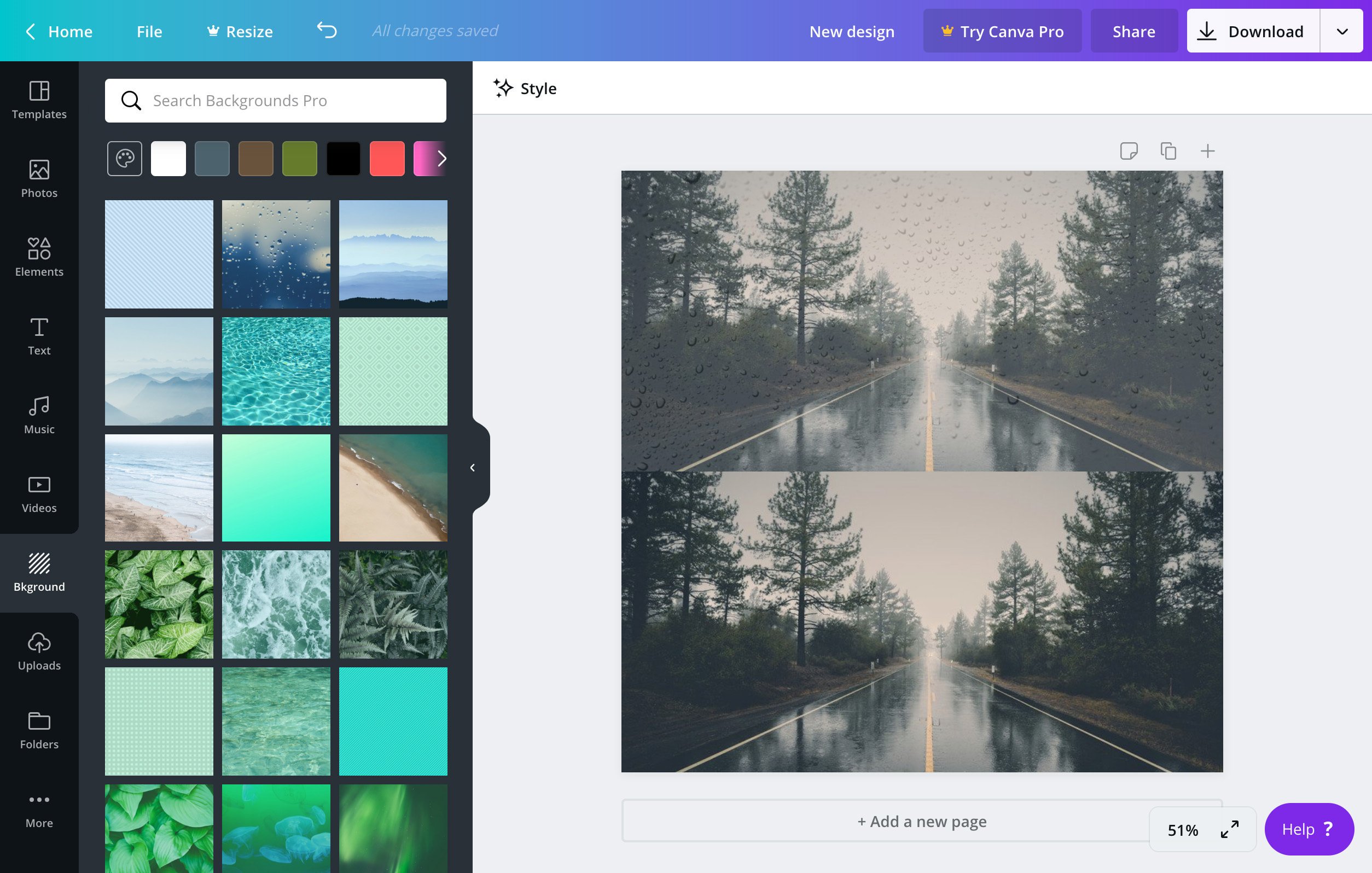
Canva's extensive suite of features helps your photos pop - From basic cropping and straightening to adding textures and color-correcting, Canva's beginner-friendly features make editing photos simple. You can add a textured background to give your photo more dimension, insert text to create your own meme, create a photo grid, blur your photo, and more.
-
Canva offers free video tutorials -If you're new to graphic design and want to learn about branding or how to incorporate Canva in the virtual classroom, there are free video tutorials on their website. With all the templates and features available on Canva, it can feel overwhelming knowing where to begin. Their Design School, filled with free video courses on a wide range of topics, is a good place to start. There's a "Getting Started with Canva" course that provides a quick overview of all the things you can do on the platform, a "Canva for Education" course for teachers to set up their virtual classroom, and a "Canva Pro" course highlighting Pro features and tips for using them. Canva Pro is a paid premium version of Canva with added features.
Features
-
Teams - Design Better Together
-
Textures - Apply Texture for Homey, Lived-In Designs
-
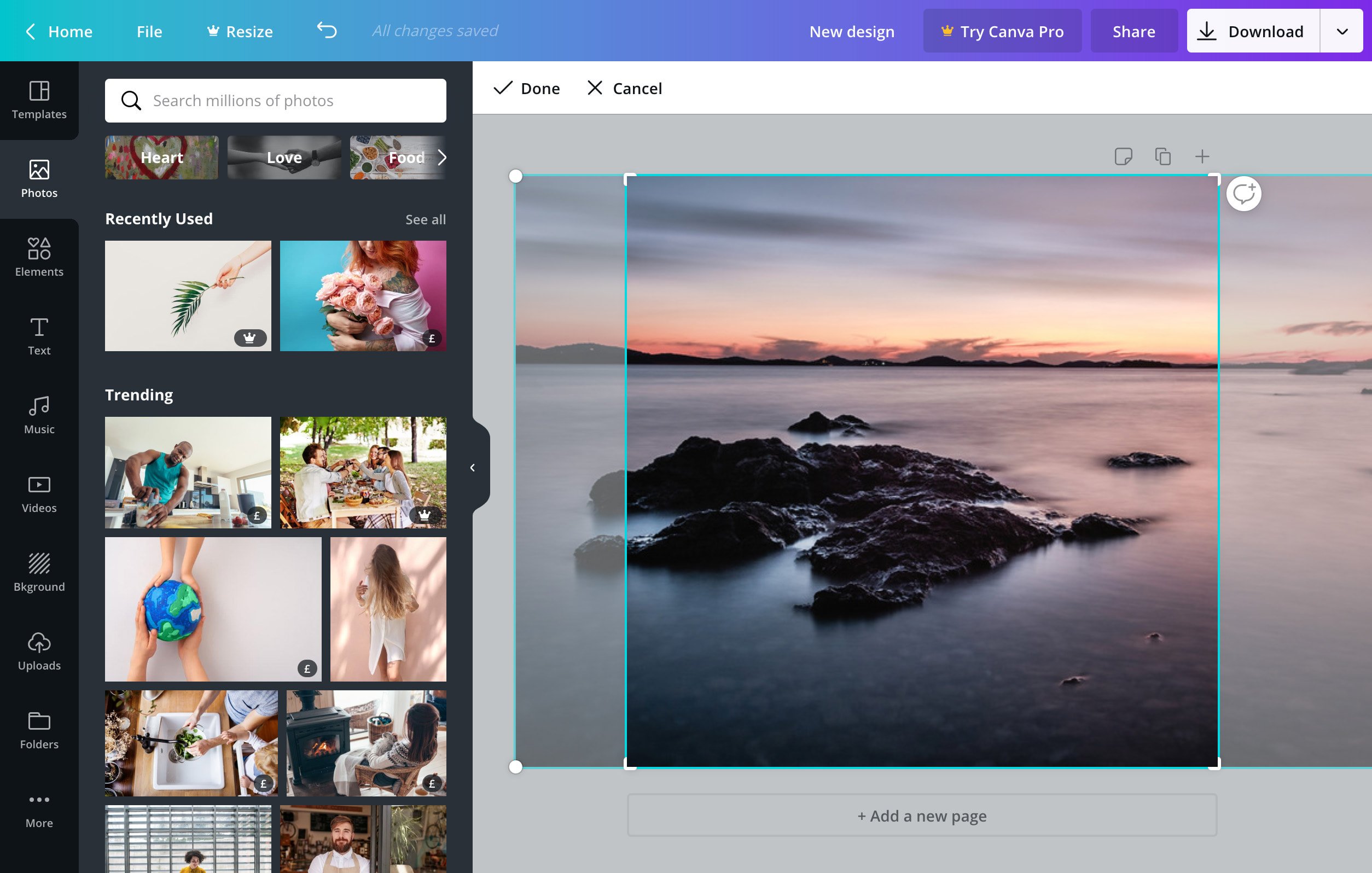
Image Cropper- Crop Your Images for Trim, Precise Compositions
-
Speech Bubble- Say It Loud with a Drag and Drop Speech Bubble
-
Add text to photo - Add Text to Any Photo for a Quick Caption or Compelling Commentary
-
Photo Effects - Add Stellar Photo Effects to Make Your Photos Magnificent
-
Photo straightener- Straighten Your Photos to Keep Your Snapshots Looking Sharp
-
Transparent images-Create Soft, Dreamy Designs with Transparent Images
-
Design and photo grids- Keep Your Photos and Layouts Crisp with Design Grids
-
Stickers- Add Stickers To Your Photos For Free - Now With Thousands of Choices
-
Frames- Add An Awesome Photo Frame Effect To Your Pictures
-
Vignette- Enhance your images with a brilliant vignette in Canva
-
Icons- Thousands of free icons to enhance your designs like a pro
-
Photo blur - Blur Your Photos in Canva with Our Blur Slider

Teams - Design Better Together Textures Image Cropper


Speech Bubble Add text to photo Photo Effects


Photo straightener Transparent images Design and photo grids


Stickers Frames Icons


Vignette Blur
Sources: https://www.canva.com/features/
Website: https://www.canva.com/
3. Survey, Polls, and Quizzes Tools
Surveys are a proven method for gathering information from your audience, to understand who uses your products and services, and most importantly, why. There are practically no limitations when it comes to the type of data you can collect from surveys from collecting campaign feedback, to product/website usability tests, and understanding potential issues customers are facing.
Two free and available tools of Survey, Polls, and Quizzes Tools
- Google Forms
Source: https://helpdeskgeek.com/wp-content/pictures/2020/03/google-forms.png
Now using Google G Suite, Google Forms are perhaps one of the most popular survey tools available, especially for simple surveys and other common uses like collecting registrations for an event, email addresses for newsletter subscriptions, answers to quick poll questions or quizzes. Google Forms is a free online tool that helps you to develop surveys, quizzes, and other interactive forms. It is part of Google's web-based applications suite, which also includes Google Docs, Google Sheets, Google Slides, and other tools.
Google forms are widely used to create surveys easily and quickly since they allow you to plan events, ask questions to your employees or clients and collect the diverse types of information in a simple and efficient way. Google forms allow us to include different types of questions such as short answers, paragraphs, multiple selections, verification boxes, pull-down, linear scale, a grid of several options, among others.
Features
-
Surveys
-
Questionnaires
-
Custom forms
-
Drag-and-drop
-
Customize values
-
Reorder questions
-
Add images, videos, and custom logic
-
Real-time response information
-
Automatic summaries
-
Access control
-
Data validation rules
-
Collect & organize information
-
Create polls & pop quizzes
-
Customizable branding
-
Curated themes
-
Multiple choice
-
Dropdowns
-
Page branching
-
Question skip logic
-
Responsive forms
-
Real-time response charts
-
Export to Google Sheets
-
Multi-user collaboration

Source: https://www.talkwalker.com/uploads/2020/apac/best_survey_tools/Google%20Form%20question%20options.PNG
Website: https://docs.google.com/forms/u/0/
- Typeform | People-friendly forms and surveys

Source: https://images.ctfassets.net/co0pvta7hzrh/5A4NiAWcPUDSXrkCH7z2EL/b7e0d1f307daf23c71707ed6051dcac3/typeform-metaimage.png
Typeform is all about ‘turning data collection into an experience’. It is designed to be engaging and ‘conversational’ in the way that questions are being asked. Likewise, according to Typeform, their surveys are easy to use, no coding needed. They have a wide set of templates to create surveys around user persona, lead generation, branding questionnaires, product research, and more.
Features
- Unlimited questions and unlimited Typeforms supported on all paid plans. A free plan seems to be available where people can sign up directly.
- Number of responses and logic jumps depend on the paid plan tier.
- Thank you screens and respondent email notifications.
- Customizations of domain and meta info, and ability to remove Typeform branding, and team collaboration possible.
- Ability to use Facebook Pixel, Google Tag Manager and integrate with applications like Mailchimp, Airtable, Google Analytics, HubSpot, Zapier, and Slack.
Website : https://www.typeform.com/
4. Web Conferencing Tools
The term “web conferencing” encompasses collaboration technologies that enable users to place calls via an application over the internet, through software downloaded locally to a computer or device, or in an on-premises environment. Web conferencing encompasses popular real-time collaboration solutions like video conferencing, screen share, document sharing, and online meetings.
Two free and available tools of Web Conferencing Tools
- Join.me

Source: https://gdm-catalog-fmapi-prod.imgix.net/ProductLogo/e5b3a2cf-bc2f-42a4…
Join.me is the fastest and easiest way to connect and collaborate. Anyone can share ideas instantly with screen sharing, audio, video, whiteboard and chat.join.me is a personalized meeting experience where users can personalize participant’s bubbles, URLs, backgrounds and more!
The free version of Join.me allows you to hold an unlimited number of meetings with up to 10 participants per meeting (one organizer plus 9 viewers) using up to five video streams. You can chat with participants, transfer files, join the audio part of any meeting by internet (VoIP), and allow participants to control your computer.
With the simple click of a button, join.me Android users can instantly meet face-to-face, collaborate and share their entire device screen, apps, web pages or a document. join.me PRO and join.me BUSINESS users will find all the features they know and love from the join.me desktop app – pass presenter, recording, chat, and more. And you can audio conference by phone or Internet (VoIP) so that you, and everyone else involved, can see and hear everything in real time.
A wise man once said “a picture is worth a thousand words”. join.me thinks it’s worth way more. At least when a mobile whiteboard is involved. Hands down, it’s the simplest, most effective way to brainstorm, demonstrate ideas and close sales. Our Infinite Canvas lets you draw, edit, and add images to your heart’s content. Once you try it, you’ll wonder how you ever worked without it.
Features:
-
Join conference calls
-
Multiple channel access (VoIP, phone line etc.)
-
Live text chat tool
-
Share screens and screen control
-
Share mouse control
-
Multiple screen sharing
-
Pass presenter role
-
Annotate meetings
-
Record meetings
-
Schedule meetings
-
Exit meetings option
-
See who's in meetings
-
Send files
-
Remove disruptive members
-
International conference lines
-
Audio settings, mute users
-
Lock meetings
-
Add multiple participants
-
Up to 250 participants
-
Join from over 40 countries
-
Audio conferencing
-
Mobile apps
-
One-click scheduling
-
Personal link
-
Whiteboarding
-
Screen sharing
-
Presenter swap
-
Developer API
-
Meet face-to-face when on-the-go
-
Record audio, screen shares, or both

Source: https://eztalks.com/res/2021/03-16/13/c08575f0897eee1f791a720096bb741e.png
Website: https://www.join.me/
- Google Handouts

Sources: https://enovec.com/wp-content/uploads/2019/12/Google-Hangouts-logo.png
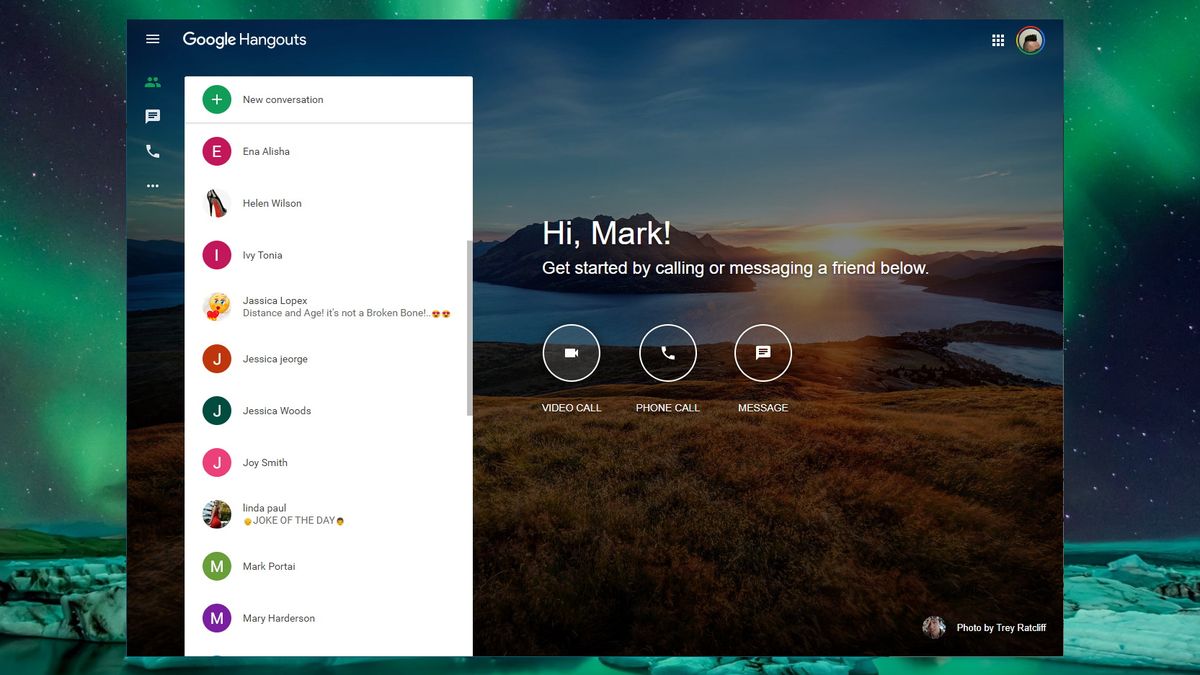
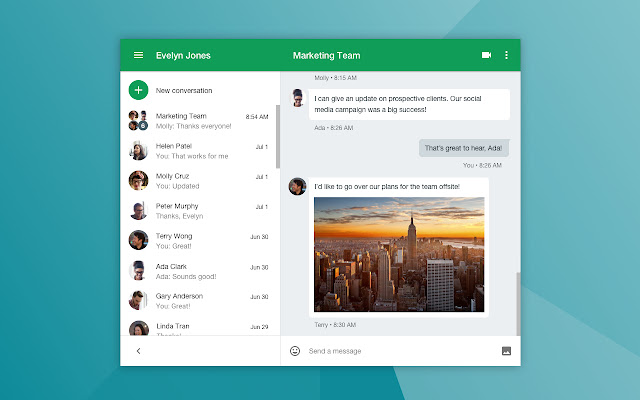
Google Hangouts is a communications platform developed by Google that helps users to start and join in different communication channels like instant messaging, voice calls and video calls. Google Hangouts is proven to be useful in either one-on-one implementation or a group. Hangouts are integrated into Google+ and Gmail. For added mobility and versatility, mobile apps for iOS and Android devices are also available.
Hangouts allow conversations between two or more users. The service can be accessed online through the Gmail or Google+ websites or through mobile apps available for Android and iOS (which were distributed as a successor to their existing Google Talk Apps). Chat histories are saved online, allowing them to be synced between devices. A “watermark” of a user’s avatar is used as a marker to indicate how far they have read the conversation. Photos can be shared during discussions, which are automatically uploaded to a private Google+ album. Users can also now use color emoji symbols in their messages.
Google Hangouts can easily handle the communication demands of corporate settings. The advantage is that the employees get to communicate using a platform with a resemblance to a social network, and feel comfortable sharing information they know that will be secured following the newest protection standards.
There are different ways for business to benefit from Google hangouts. In a corporate setting, Google Hangouts can be implemented as a collaboration platform for meetings and interaction between business owners and their customers via HD video. They can also save expenses and time on travel with Hangout’s face-to-face functionality for online meetings and conferences.
Google Hangouts without a doubt is one of the most affordable communication tools available. It is why it holds the leading positions in our Communications Software Category.
For businesses that need live video broadcasting, Google Hangouts has a feature which enabled Google+ users to stream video calls via youtube.
Would you like to see, hear, and share information to your online learners? With Google Hangouts you can have a video group chat for up to 10 people for free! It is a powerful tool much better than a web chat.
About Google Handouts
-
Hangouts - free messaging, video, and voice
-
Use Hangouts to keep in touch. Message contacts, start free video or voice calls, and hop on a conversation with one person or a group.
-
Include all your contacts with group chats for up to 150 people.
-
Say more with status messages, photos, videos, maps, emoji, stickers, and animated GIFs.
-
Turn any conversation into a free group video call with up to 10 contacts.
-
Call any phone number in the world (and all calls to other Hangouts users are free!).
-
Connect your Google Voice account for phone calling, SMS texting, and voicemail integration.
-
Keep in touch with contacts across Android, iOS, and the web, and sync chats across all your devices.
-
Message contacts anytime, even if they’re offline.
Features
-
Instant Messaging
-
Voice Calls
-
HD Video Calls
-
HD Group Conferencing
-
Auto Screen Focus
-
Intelligent Muting
-
Compatibility with multiple computing devices
-
Built-in screen sharing
-
Hangout on Air
-
Integration with other Google applications
-
Custom Control for Admins
Sources: https://cdn.mos.cms.futurecdn.net/4b39FMBL9wGUHZWAFvJRF-1200-80.jpg https://lh3.googleusercontent.com/CvcFWI8dg6IVXjR57Ggqg88RWFxof73rAsUI2iK4xyX4X5Xm8ksvynKS8cDJKXeLgG1CPK74zHaQIYncNr7lPg76Sg=w640-h400-e365-rj-sc0x00ffffff
Website: https://hangouts.google.com
5. Stock Photo Sites
People are mostly visual creatures that tend to see pictures rather than read sentences. Looking at a picture or photo rather than reading a line of text allows us to absorb much more information in a shorter amount of time. Photos, diagrams, graphics, videos, and other visual images are all examples of visual images. For several companies, though, providing an in-house archive of original photographs at their fingertips isn't feasible.
Stock image websites are services that provide businesses and graphic designers with a host of thousands to millions of existing stock photos, graphics, illustrations, and royalty-free images. Stock images are often used for marketing and advertising purposes, for publishing, for websites and blogs, for promotional work, and for commercial or personal projects.
Two free and available tools of Stock Photo Sites
- ISO Republic

Source: https://visme.co/blog/wp-content/uploads/2020/09/21..jpg
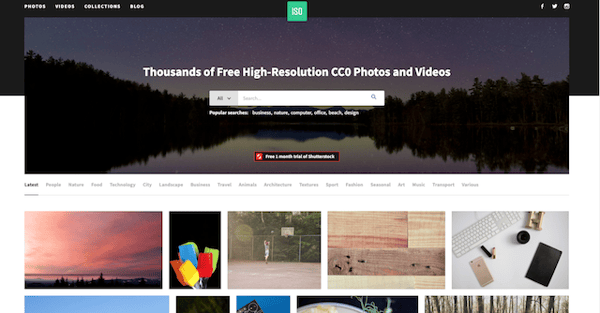
ISO's Republic's mission is to "provide high-quality images to be used by designers, developers, bloggers, marketers, and social media teams." (Stec, Carly. 2021). Gain access to an extensive collection of free images and videos for your business with ISO Republic. They offer a variety of business photos, people and places, flat lay designs, technology, and other scenes.
Features trending photo topics:
-
Beach Photos
-
HD Wallpaper
-
Women Pictures
-
Flat Lays
-
Abstract
-
Flower Photos
-
Love Pictures
-
Computer Tech
-
Design
-
Mobile Wallpaper
-
Office Pictures
-
Sky and Clouds
-
Summer Travel
-
Forest Photos
-
Sunset Views
-
Backgrounds
-
Water Photos
-
Work Scenes
Sorurce: https://www.bluleadz.com/hs-fs/hubfs/Blog_pics/ISO-stock-site.png?width=600&name=ISO-stock-site.png
Website: https://isorepublic.com/
-
StockSnap.io

Source:https://i0.wp.com/businesskitbag.com/wp-content/uploads/2016/07/PRL-StockSnap.png?fit=400%2C240&ssl=1
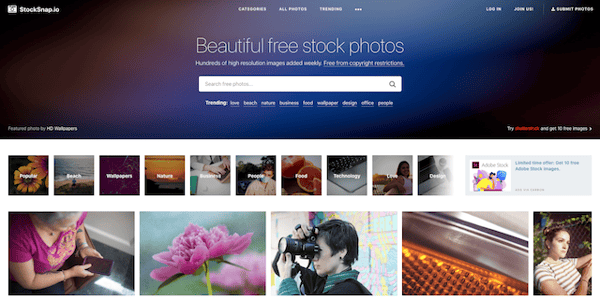
If you want a large selection of free stock photos and high-resolution images, then check out StockSnap.io. The stock image platform adds images every day for you to download, and all images are released under the creative commons domain. This means the images do not need to be attributed. They also track downloads and views so you can find the most popular images they have available.
Features trending photos of StockSnap.io
-
HD Wallpaper
-
Work From Home
-
Business Pictures
-
Background Images
-
Nature Images
-
Spring Flowers
-
Computer Pictures
-
Pictures of Food
-
Office Photos
-
Women Pictures
-
Cool Wallpapers
-
City Images
-
Coffee Images
-
Family Pictures
-
Beach Pictures
-
Car Pictures
-
Textures and Patterns
-
Design Pictures
-
Flat Lays
-
Travel Pictures
-
Photos of Space
-
Fashion Images
-
Men Photos
-
Love Pictures
-
Pictures of People
Collections
-
Virtual Backgrounds
Source: https://www.bluleadz.com/hs-fs/hubfs/Blog_pics/stock-snap-io-site.png?width=600&name=stock-snap-io-site.png
Website: https://stocksnap.oi/
6. Video Tools
The manipulation and arrangement of video shots are known as video editing. All video information, including films and television shows, video advertisements, and video essays, is structured and presented using video editing. The video tools are the tools that will be used in video editing to organize and arrange the video.
Two free and available tools Video
- KineMaster

Source: https://comparecamp.com/media/uploads/2018/11/kinemaster-logo-1.png
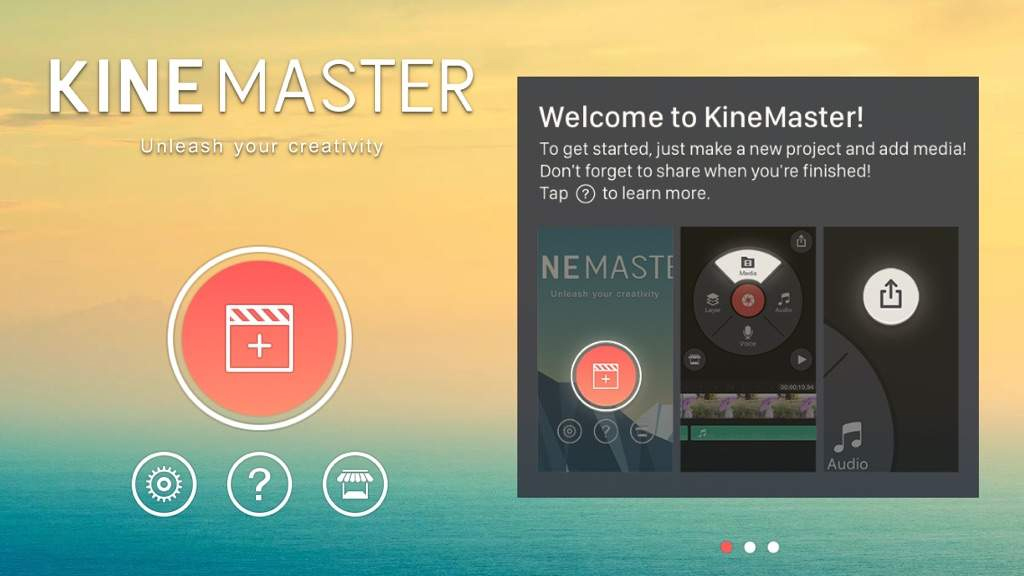
KineMaster is comprehensive video editing software designed for iOS and Android-supported devices. This full-featured app comes with exciting features and multiple tools for precise trimming and cutting of audio, text, images, video, and effects. Using KineMaster allows users to create engaging and professional-level videos by having unprecedented control over your video creations. What makes KineMaster popular is its user-friendly editing tools that can alter video effects and transition with quality and precision. This software can take your videos to a whole new dimension.
Main features of KineMaster are:
-
Speed Control
-
Effects
-
Themes
-
Adjustments
-
Multiple Layers
-
Overlays
-
Music
-
Audio Filters
-
Frame-by-Frame Trimming
-
Volume Envelope
-
Stickers
-
Instant Preview
-
Transition Effects
-
Real-Time Recording
-
Animation Styles
-
Social Media sharing
Source: https://comparecamp.com/media/uploads/2018/11/KineMaster.jpg
Website: https://www.kinemaster.com/
- Animoto

Source: https://animoto.com/static/logo-f7bad0df2a4af8688773dca5ee0b1ed6.png
When you pronounce the word “animoto”, you may see that the stem of the word was taken from animation. In general, this can be the core function of Animoto video maker, an online cloud-based tool that creates videos of images, photos, allows creating slideshows with background music etc.
There is no any difficulty in using Animoto as the tool is intuitively comprehensible.
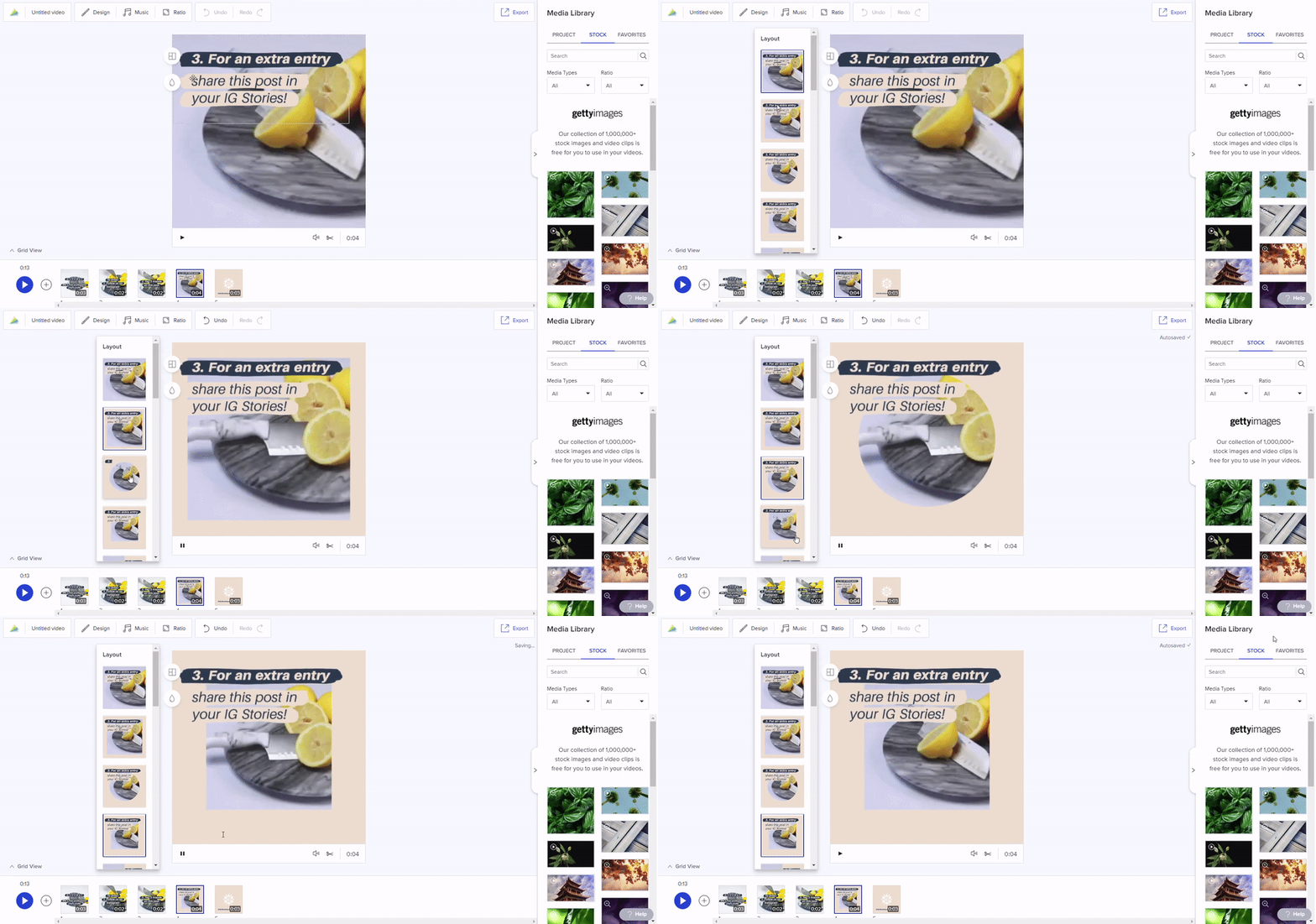
You can create a new video in three simple steps such as:
-
The choice of both a style and a song in the background.
-
Customization when you may add photos, images, video, text etc.
-
Finalizing the creation process by producing and/or sharing it.
Features of Animoto.
-
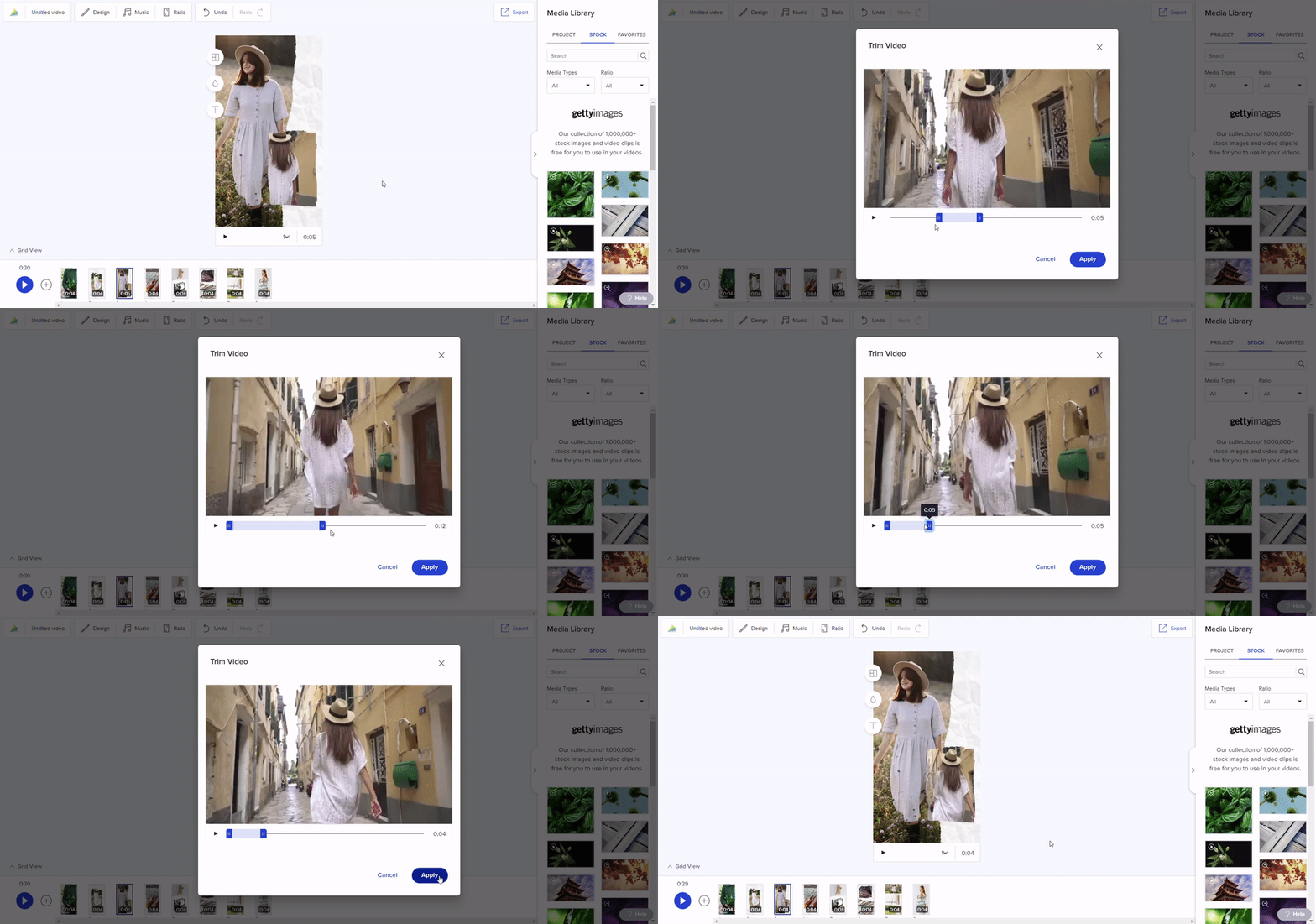
Blocks - Animoto videos are created by mixing and matching blocks. You can easily add, remove, or drag and drop to reposition blocks within any video project, whether you’re using one of our video templates or starting from scratch.
-
Templates- Animoto features a variety of different layouts, which allow you to combine text, images, and video clips in a single dynamic frame.
-
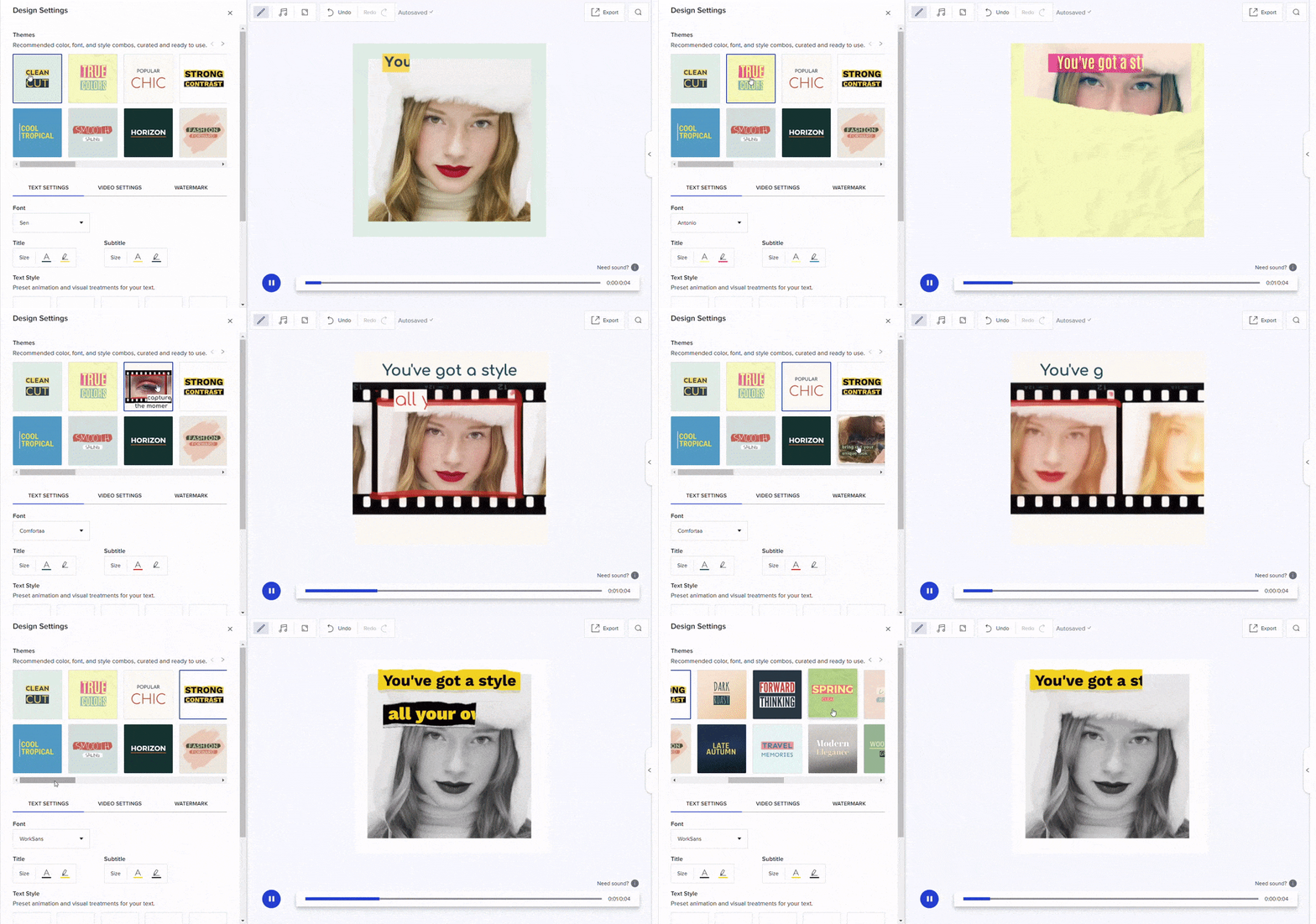
Design Settings -To access the design tools, click on the Design button at the top of your workspace. Here’s what you’ll find: Themes, Text Setting, and Video Setting
-
Music Library - A subscription to Animoto comes with a commercially licensed song library, filled with music you can use in your Animoto videos.
-
Aspect Ratio Switching - Click on the Ratio button to switch between vertical, square, and landscape. If you want to use the same video more than once across different platforms, make a copy of your first video, then change the aspect ratio on the copy.
-
Undo and Redo - Edit with confidence with our undo and redo options. You can find both buttons at the top of your workspace. If you change your mind about an edit you’ve made to your video, just click Undo to remove it. If you remove something you wish you’d kept, click Redo to bring it back.
-
Media Library - Your Media Library is where you find and store the images and video clips for your project.
-
Timeline and Grid View - Animoto makes it easy to edit different parts of your video by offering two different ways to view your whole project. In either case, you can use these views to delete, copy, or move blocks around within your video.
-
Video Hosting and Downloads - Your Animoto videos will be saved and hosted on your account forever so you can always log in to access them. Access your videos on any computer or browser, simply by logging in.
-
Copying and Re-editing Videos - You can always go back in to re-edit an old project. But you can also make a copy to save the original version while making changes to a new version.
-
Reselling Videos - Last but not least, we wanted to share a quick note on reselling videos. Customers on our Professional plan are licensed to resell the videos they create to customers.
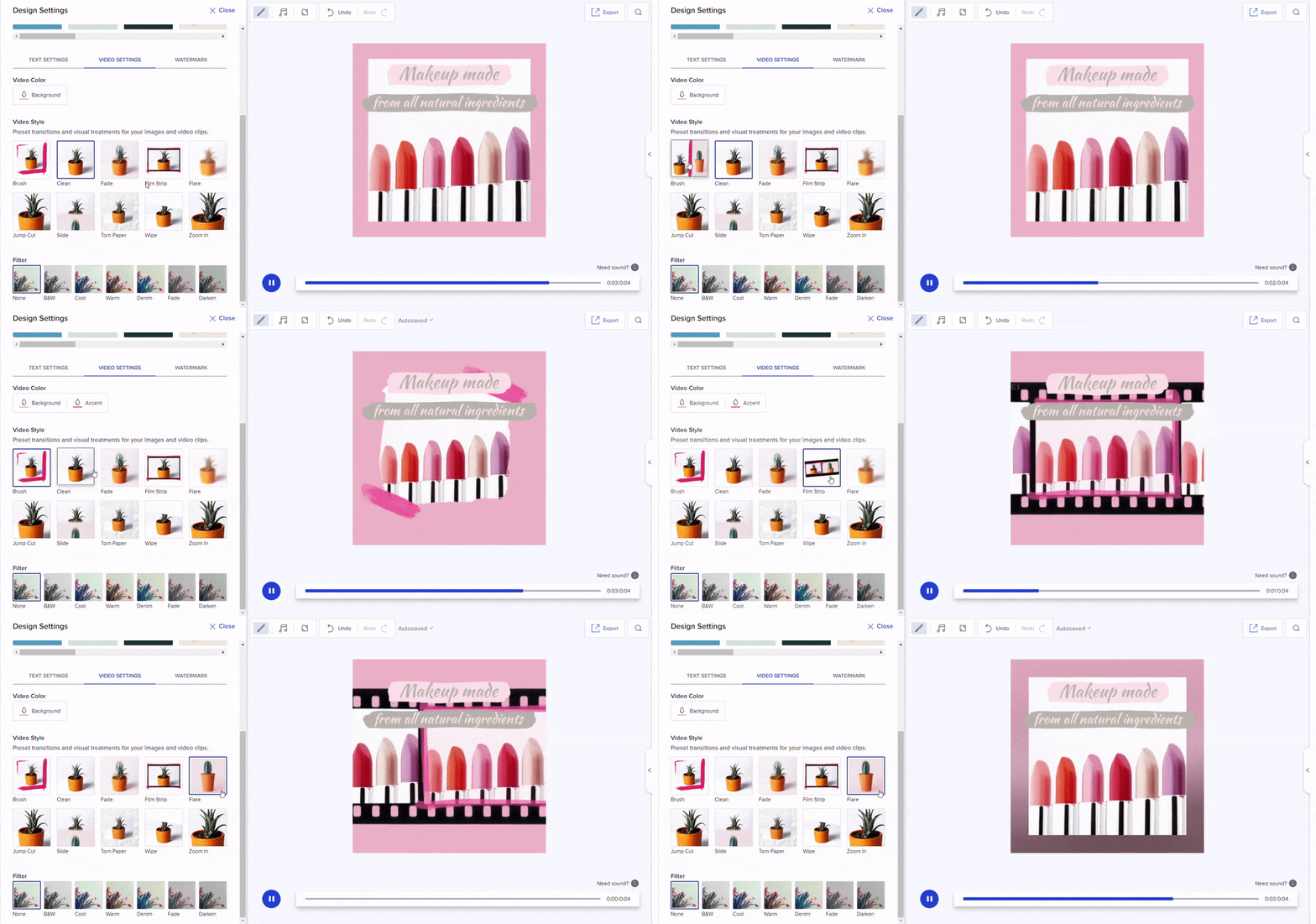
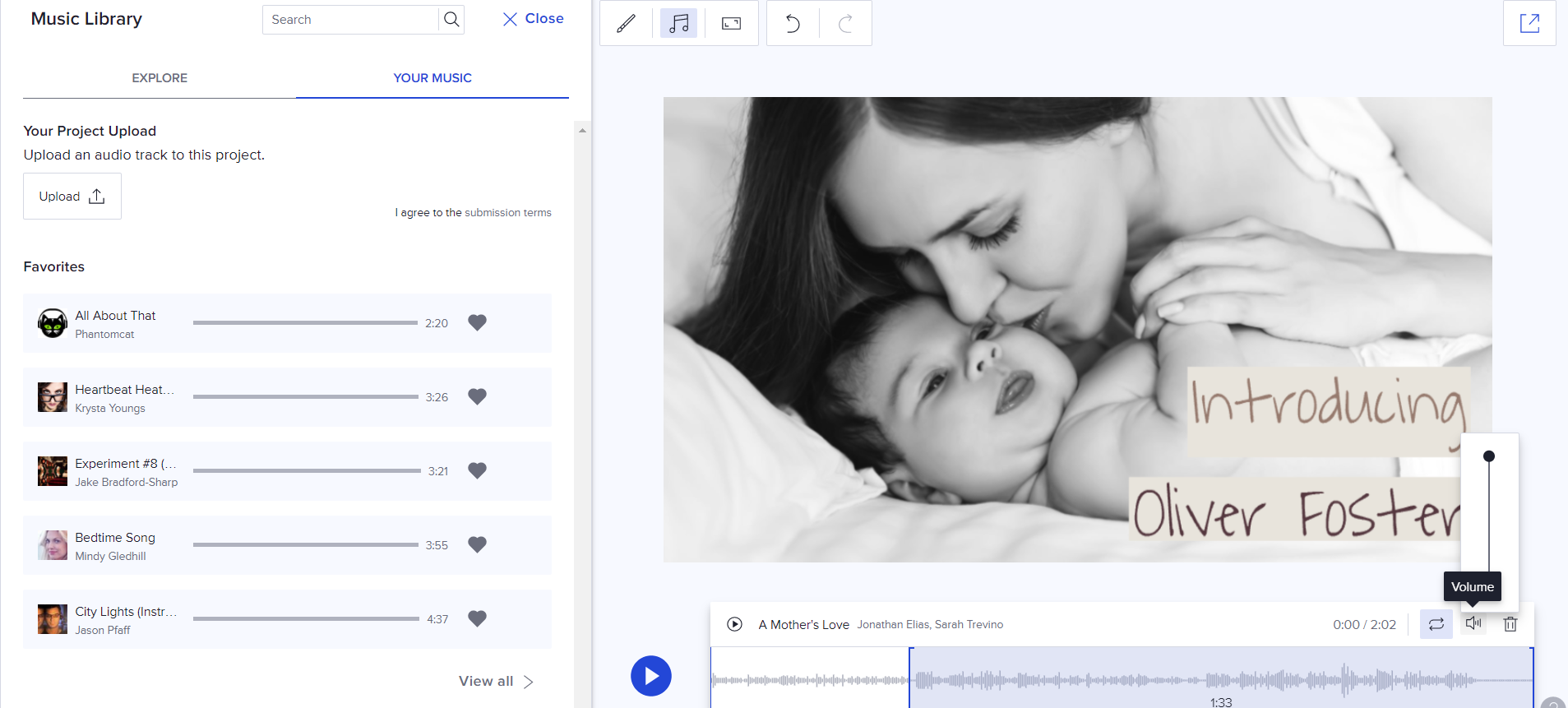
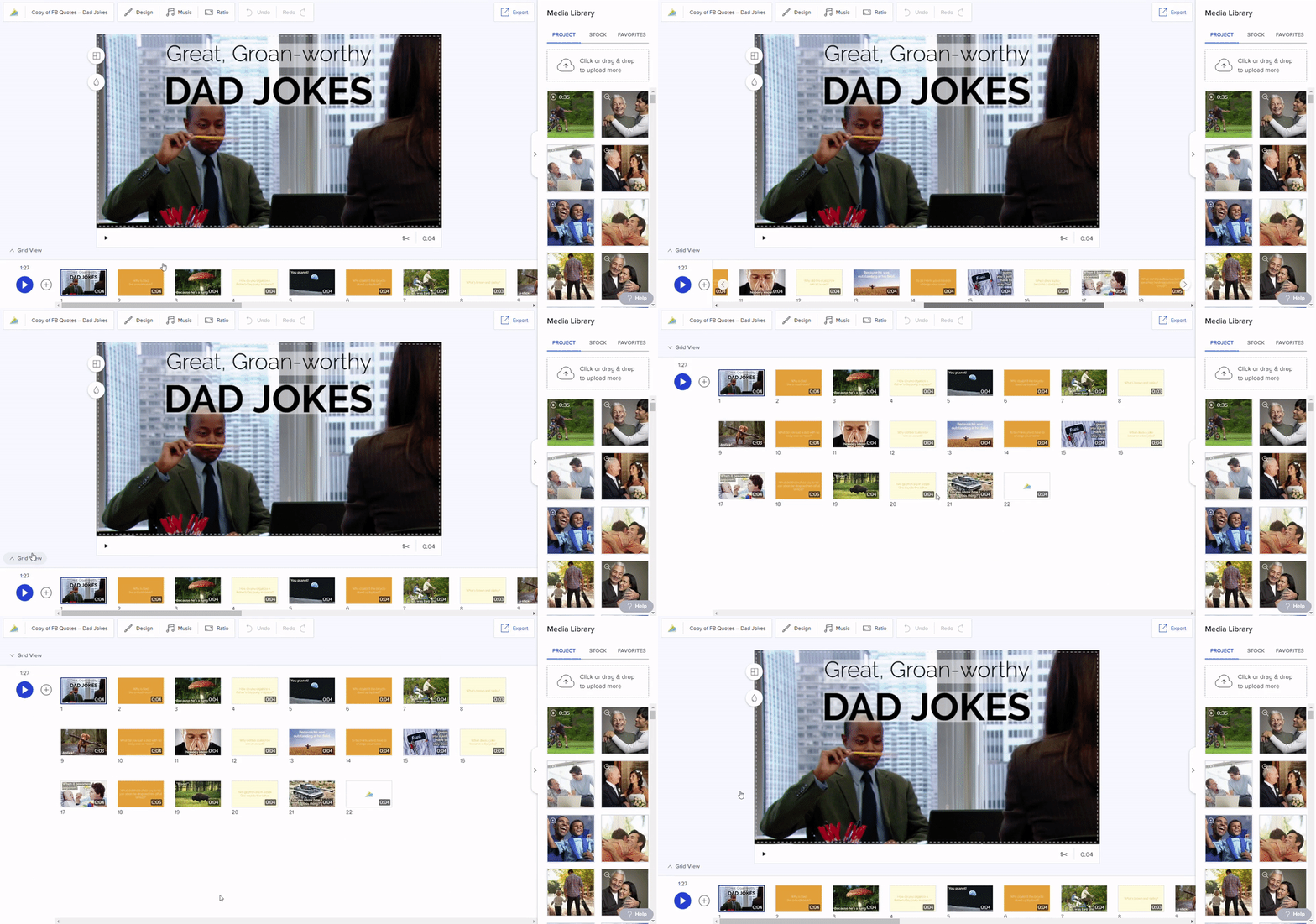
Source: O'Neill, Megan. (2019). " Complete Guide to Getting Started with Animoto" https://animoto.com/blog/guides/getting-started-animoto
Website: https://animoto.com/
7. Testing and quizzing tools
Testing/quizzing tools come with advanced features for learner assessment, management and tracking, automatic test grading, certificate management, and more. Its typical features are automated grading and learner feedback, custom test completion certification process, conversion and upload of PDFs, PowerPoint, Word documents, etc., upload lives web content such as YouTube videos, blog posts, wikis, embedding and sharing quizzes onto websites and blogs, it is an online classroom for creating different learner profiles and clubbing them into group or classes, it detailed reports and data analysis such as User reports and Group reports, question difficulty report, time spent report, compliance report, etc. And there are a lot of testing and quizzing tools that a facilitator can actually use to deliver an effective assessment.
Two free and available tools of Testing and quizzing tools
- Easy test maker

Source: https://www.easytestmaker.com/Content/Logo.png
Easy test maker is an online test generator to help you create and manage your tests. Its features are; perfectly formatted tests, online test graded automatically, question pools, question analysis reporting, alternative versions to reduce cheating, it build exams with ease, it export to word or pdf, and it can make the most of you time.
Features
- It is an indeed perfectly formatted test because it can create multiple-choice, fill-in-the-blank, matching, short answer, and true or false questions. It can add instructions and divide your test into multiple sections.
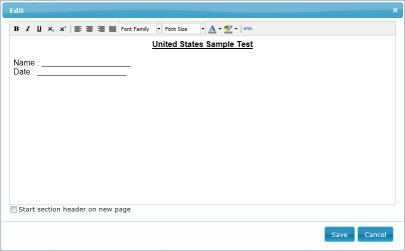
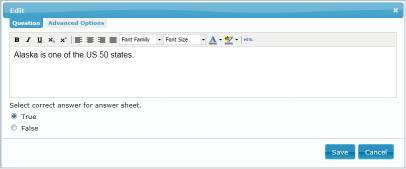
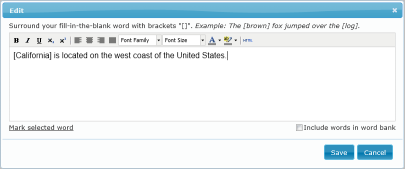
Section / Instructions True or False Fill in the blank
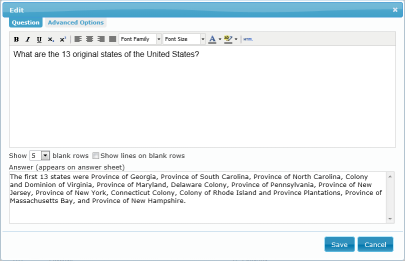
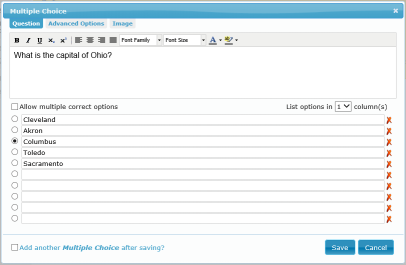
Short Answer Multiple Choice
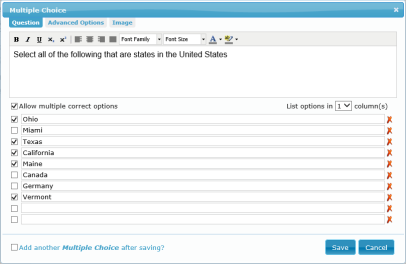
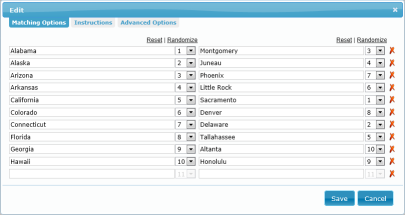
Multiple Choice Matching Types
Sources: https://www.easytestmaker.com/Tour/Questions
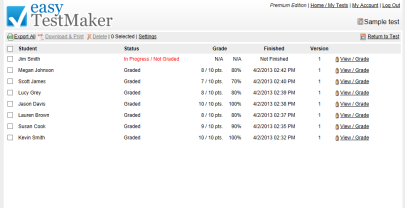
- Published online test are graded automatically. It can view and print student’s results and override grading when necessary. It says that the same test you print is the same test you publish online.
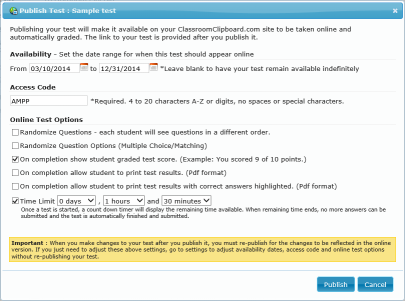
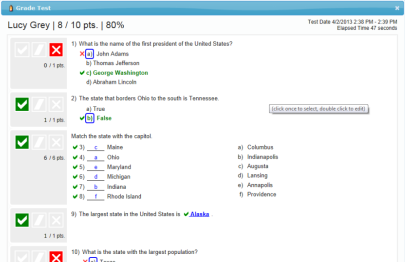
Sources: https://www.easytestmaker.com/Tour/OnlineTest
-
It can create a test with your entire question bank (Question Pools). Publish your test and choose to present as few or as many questions as you require.
-
(Question analysis reporting), it is a quick and easy report to see how many test-takers answered which questions right and wrong.
-
Alternative versions and answer sheets provided with no extra work. Questions and answer choices automatically resort to a different order.
-
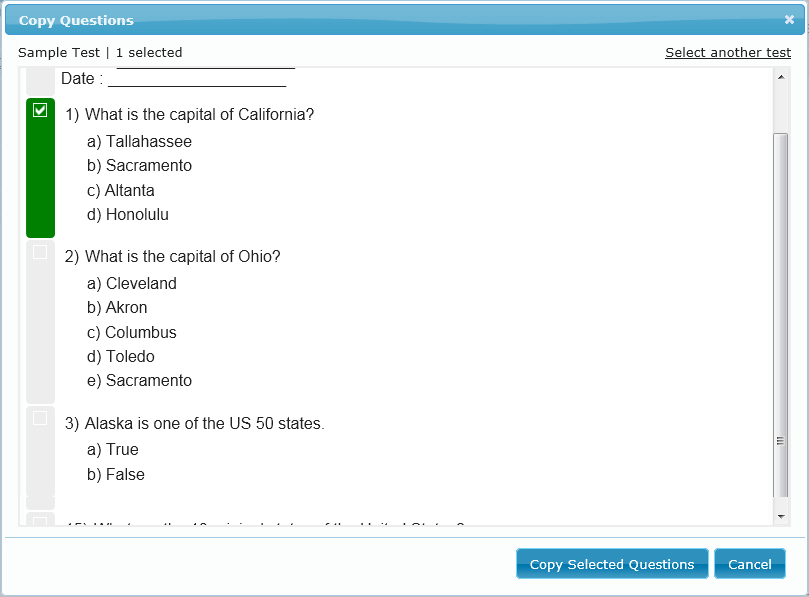
It creates an exam from your existing tests with just a few clicks. At any time you can copy a question from one test to another one.
Sources: https://www.easytestmaker.com/Tour/ExamBuilder
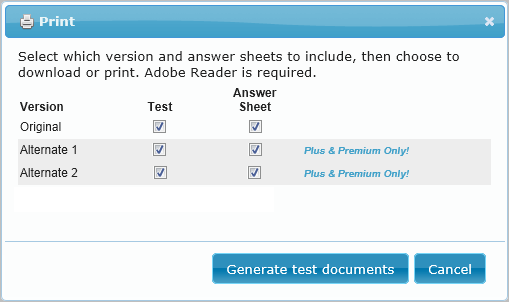
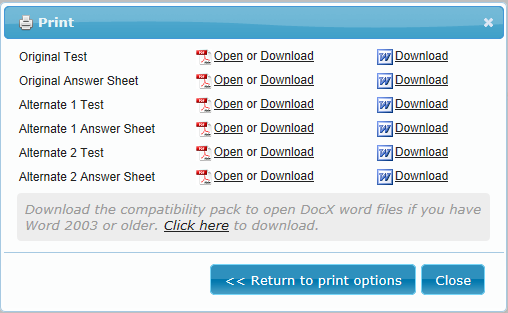
- Export to Word or pdf. Any test, any version, including answer sheets can be download as a Microsoft Word or PDF document to be saved and printed later.
Sources: https://www.easytestmaker.com/Tour/Printing
- Easy test maker eliminates wasted time spent on formatting. Add new questions and sections, move them around as needed and let it do the hard work for you. All your test are saved for easy retrieval. You can actually make changes or print out additional copies of any test you create.
Website: https://www.easytestmaker.com/
ConductExam

Source: https://i.pinimg.com/originals/36/60/c7/3660c7d2697a9f1f1ea944777f8f0258.png
ConductExam is a powerful web-based online exam software to give/take online exams in a real and proficient environment with a similar test interface. It is a straightforward online exam software that automates the entire examination process for schools, colleges, universities, coaching institutes, employers, cooperates, and certification providers for quick and precise exams. IT is also an online examination system; the administrator/ teachers can create, schedule, and analyze online exams, quizzes, and recruitment tests at any point in time. An exam administrator has full freedom to create an online education or online exams for practice at any point in time.
Features
-
First, It can create unlimited tests/exams in different formats with our online exam software. The administrator of online exam software can create a test by selecting the questions from the question bank. Once the test is ready, it can be scheduled at a defined date and time to make it active. It is effortless to add/import different types of questions from pdf, word, and excel through the best online exam software. This online exam website supports various exam formats like multiple choices, multiple choices with multiple answers, fill in the blanks, true & false, essay, matrix match, match the following, etc.
-
Second, It also shares/Schedule Exams, Once the test is ready, you can schedule a defined date and time for registered users and students. The user can log in to the test with their login id and password. The administrator can add/import users under different batches/courses; the standard also sends email/SMS notifications for the account creation, forgot password, etc.
-
Third, Analyze Exams easily views/export different types of reports for the conducted online test or exams and analyze each user/students’ performance. Get a detailed analytic for the examination conducted, online test series sold, a student registered, etc. Students can compare their performance through various reports like test analysis; the time has taken on each question/topic/section, comparison with topper, question wise solution & explanation, etc. Also, one can check the attempted, left, right, wrong questions, and determine their strengths and weak performance areas. Students can give online exams with desktop, laptop, and mobile. One of its Important Features are 1. Question Bank Management; Supports various question types, Single choice (Partial Mark Support), Multiple choices (Partial Mark Support), True & False, Matrix Match (Partial Mark Support), Match the following, Fill in the blanks, (Support range answer., Descriptive (Text, attachment & URL based test) 2. Test/Exam Management; Section-wise Test, Section – Wise Timer Test, Question-Based Timer Test, Mock Test, Exam Test.
Top 10 features from the Administrator point of view:
-
Easy to add/import questions from word/excel format as per different topics & subjects
-
Support different types of questions including images, formulas, and videos
-
Create tests quickly by choosing the option of random questions and share it with users or assign the date & time to the test to limit its availability
-
Send emails, notifications and share news, documents and videos on Web, Mobile, and Tablet which is accessible 24/7
-
Analyze the performance of students from different available reports
-
Publish the results automatically or by defining the date and time
-
Third-party integration is possible, i.e., SMS, email, online payment gateway, etc.
-
Sell your online test series and get monetary benefits
-
Create sub admins under your supervision and assign different roles and responsibilities
-
Import and Export of data in excel, word, and pdf formats
Top 10 features from the User point of view:
-
Synchronization of online test on Web and Mobile/Tablet which is accessible 24/7
-
Instant scorecard after submitting the online test
-
All India ranking available, which helps in knowing the current performance
-
Identify questions/topics/sections that take most/least time
-
Question wise solution and explanation
-
Detailed reports are available for proper Test Analysis
-
Analyze performance by comparing with toppers
-
Bookmark questions and review them anytime
-
Focus on weak areas and concentrate more on it
-
Download the available Documents and Videos
Website : https://www.conductexam.com/
8. PDF Tools
Portable Document Format (PDF) is currently establishing itself as the most widespread and commonly-used format in both the online and offline world. It's used in almost every sphere of life and alternative formats are becoming obsolete. If you want to keep up with the pack then you need a method to edit and update your existing files - not to mention create new ones. PDF-Tools is the method for you. It's the only software you need for the creation and manipulation of PDF and image files. It can be used to convert files of almost any format to/from PDF, as well as perform a huge range of additional editing options.
Two free and available tools of PDF
Doro PDF Writer by CompSoft

Sources: https://images.sftcdn.net/images/t_app-logo-xl,f_auto/p/ddb4d106-96d0-11e6-bd66-00163ed833e7/1840283336/doro-pdf-writer-logo.png
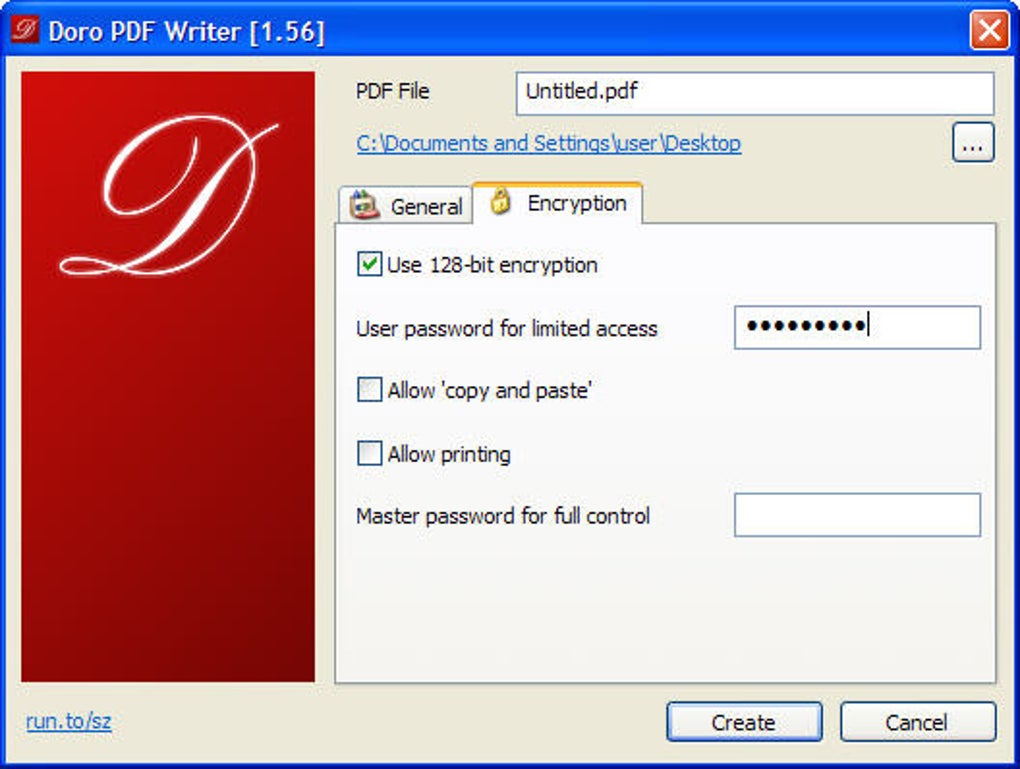
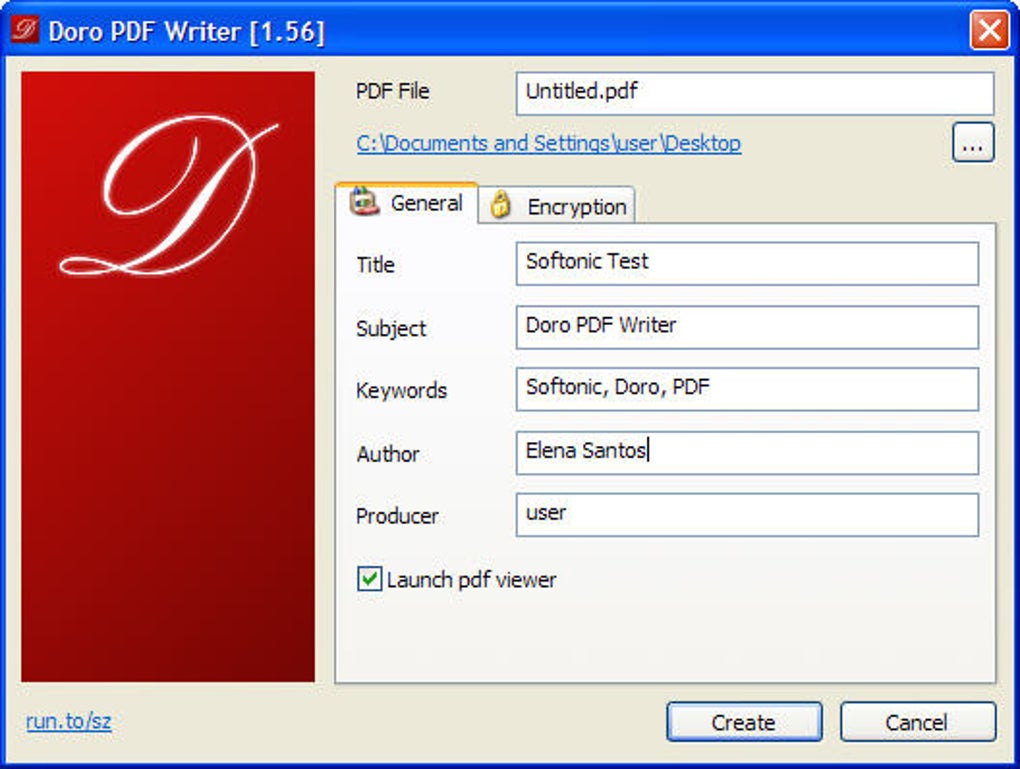
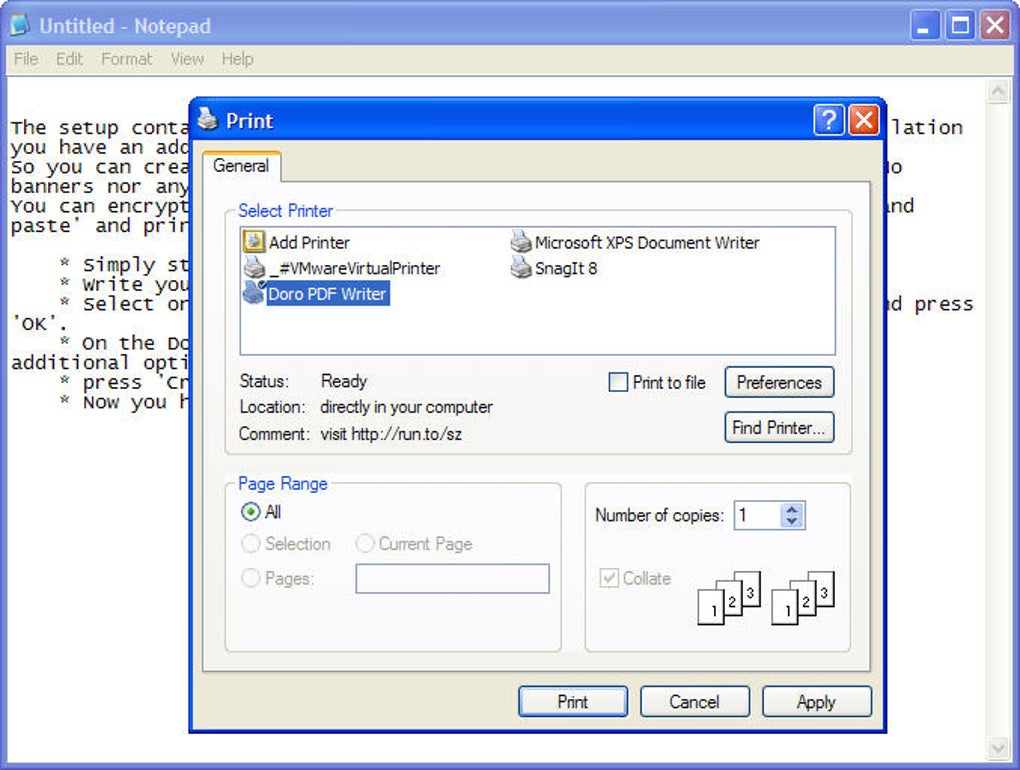
Doro PDF Writer is very easy to use and is pretty straightforward. It doesn’t have all the other options that other PDF tools have but it works great in printing PDF files. It is installed as a virtual print driver and converts any printable document or image to PDF format. It can be powerful too as it lets you set the author name and even protect it with a password before conversion. Just select it from the program’s setting menu before printing a PDF document and it will launch and provide you the option to change the document’s metadata. On top of those mentioned is the ability to enable and disable copying, pasting and printing functions of the document. It is compatible with XP, Vista, Windows 7 and 8. Doro PDF Writer is a small utility which will add a printer to your computer. So, when you will print a document, you can select the Doro PDF Writer and the document will be saved as the PDF file. Doro PDF writer will not add another program on your computer, just a printer will be added under other printers on your computer. The latest version of Doro PDF Writer also works with latest Windows 10 64-bit version. However, Doro PDF Writer is just a printer which can't let you edit PDF. But you can find a real PDF editor for this problem.
Feature
-
Multiple Annotating Features to highlight, strikethrough or add comments on the text
-
Powerful editing features to edit text and images
-
Create PDF files from a blank sheet or tons of other popular formats
-
OCR Feature to Edit Scanned documents
-
Convert PDF files to Multiple other formats
-
Minimalistic user interface, easy to access features
-
No complicated Wizard to Install program
Sources: https://images.sftcdn.net/images/t_app-cover-l,f_auto/p/ddb4d106-96d0-11e6-bd66-00163ed833e7/3157403729/doro-pdf-writer-screenshot.jpg
https://images.sftcdn.net/images/t_app-cover-l,f_auto/p/ddb4d106-96d0-11e6-bd66-00163ed833e7/4272768720/doro-pdf-writer-screenshot.jpg
https://images.sftcdn.net/images/t_app-cover-l,f_auto/p/ddb4d106-96d0-11e6-bd66-00163ed833e7/173823644/doro-pdf-writer-screenshot.jpg
Website: https://doro-pdf-writer.en.softonic.com/
PDFTKBuilder TM

Sources: https://cdn2.portableapps.com/PDFTKBuilderPortable_128.png
PDFTK Builder is a pdf manipulation utility for Windows with a great array of features including: Collate - allows you to rearrange (reorder, delete, & duplicate) pages in a single document and/or merge pages from multiple PDF documents. Split - allows you to separate each page of a PDF document into its own file.Open source freeware - no nags, no ads, and no bundled junk.
Take control of your PDF documents - merge or split pages; stamp pages or add background watermarks; add page numbers; and even rotate pages.
Features
-
Join - 'Join' allows you to combine pages from multiple PDF documents and/or rearrange pages in a single document (reorder, delete, & duplicate). Multiple documents will be joined in the order they are listed in the 'Source Documents' window. If you wished to insert pages from one document into the middle of another, the main document would have to be listed twice, once before (listing pages to appear before) and once after (listing pages to appear after) the document containing the pages to be inserted. If page ranges are not specified, PDFTK Builder will assume all pages for that document are to be included. Page ranges for each document in the list can be indicated by using a single page number, or a hyphen between start and end pages (reversed page orders are allowed). Multiple ranges are indicated by using commas or semi-colons between ranges.
-
Split - separates each page of a PDF file into separate (numbered) PDF documents.
-
Background, Stamp & Page Numbering - 'Background' allows you to add a background to each page in a document or just the first page. The 'background' (eg a company logo, or a 'draft' watermark) must be another PDF document (the first page of that document if it has more than one page). 'Stamp' is very similar to 'background' except that the 'stamp' is placed on top of the source document. Page numbering initially defaults to stamping numbers in the bottom right corner of an A4 document in portrait orientation. These default values can be changed in PdftkBuilder.ini. (Layout dimensions are defined in 1/72 inches.)
-
Rotate - 'Rotate' enables you to rotate a range of pages in a document. The rotation angle options are: right or left 90º; or 180º.
-
Password Protection: The new document can be password protected (encrypted) by providing 'owner' and 'user' passwords. The 'owner' password does not stop users from reading the document, but it does restrict the actions that users can perform on that document - printing, copying, decrypting etc. Specifying a 'user' password will stop anyone without either 'user' or 'owner' passwords from opening and reading the document. The Password Protection panel can be toggled open and closed either by double-clicking it (or by typing either Alt+P or Ctrl+P).

Sources: https://cdn2.portableapps.com/PDFTKBuilderPortable_small.png
Website : https://portableapps.com/apps/office/pdftk_builder_portable
Conclusion
Almost everyone in the world has adopted how technology has evolved. The continuous development of our technology is the result of the development of digital tools, which we apply and adapt even in education. Now it played an important role in the processes of teaching and learning which are it indeed improves the communication between teachers and students, among other things. The advantages and benefits of digital tools in the teaching and learning process are understood, and it is recognized that it contributes significantly to the field of education. The eight categories of digital tools mentioned that each of them has its own functions and features that support the teaching-learning process. Each category's functions are also specifically aligned with education, which is essentially available to both the teacher and the student. While its features will be useful and beneficial in education. Indeed, these digital tools assist teachers and students in improving communication, collaboration, creativity skills in order to complete a task, giving students individuality, enhance education system management, encouraging collaboration, and supporting communication between teachers and students.
Credits
Izzo, Lenny. (2021). “Top 5 Reasons to Use Digital Tools for Key Campus Processes “ Retrieved from https://www.watermarkinsights.com/resources/blog/top-5-reasons-to-use-digital-tools-for-key-campus-processes
School of Education Online Programs. (2020). “How Important Is Technology in Education? Benefits, Challenges, and Impact on Students” Retrieved from https://soeonline.american.edu/blog/technology-in-education
Department of Health and Social Care. “TOOLS: Knowledge of common digital tools and how they can help you do your job” Retrieved from https://engage.dhsc.gov.uk/digitalpassport/tools/
Matthew, Lynch. (2017, September 6). Retrieved from https://www.thetechedvocate.org/must-blended-learning-apps-tools-resources/
- Online Bibliography and Citation Tools
Pappas, Christopher. (2013). “12 Best Free Online Bibliography And Citation Tools (2017 Update)” Retrieved fromhttps://elearningindustry.com/12-best-free-online-bibliography-and-citation-tools
Educatorstechnology. (2015). “ CiteFast- An Incredibly Easy Citation Tool for Students” Retrieved from https://www.educatorstechnology.com/2015/07/citefast-incredibly-easy-citation-tool-for-students.html
Retrieved from:
https://www.plagiarism.org/article/whats-a-bibliography
https://www.citefast.com/faq.php
- Photo and Image Editing Tools
Patel, Neil. " 5 Image Editing Tools that Make You Look like a Pro" Retrieved from https://www.google.com/amp/s/neilpatel.com/blog/image-editing-tools/amp/
Retrieved from:
https://en.m.wikipedia.org/wiki/Pixlr
https://en.wikipedia.org/wiki/Canva
https://www.canva.com/features/
- Survey, Polls, and Quizzes Tools
Christine. ( 2020) “10 best survey tools (for marketing and consumer research)” https://www.talkwalker.com/blog/best-survey-tools
Melo, Sandra. (2018). “Advantages and disadvantages of Google forms” https://mydatascope.com/blog/en/advantages-and-disadvantages-of-google-forms/
Google Forms Features Retrieved from https://www.getapp.com/website-ecommerce-software/a/google-forms/features
- Web Conferencing Tools
Pappas, Christopher. (2013). “ 8 Free Web Conferencing Tools ” Retrieved from https://elearning industry.com/8-free-web-conferencing-tools
Portal Integrators. (2018). " Features of Google Hangouts" Retrieved from https://portalintegrators.com/features-of-google-hangouts/
Retrieved from https://www.getapp.com/it-communications-software/a/join-me/features/
Retrieved from https://www.cisco.com/c/en_ph/solutions/collaboration/what-is-web-conferencing
Retrieved from https://www.capterra.com/p/175001/join-me
Retrieved from https://en.wikipedia.org/wiki/Google_Hangouts
- Stock Photos Sites
Stec, Carly. (2021). “ 24 of the Best Free Stock Photo Sites to Use in 2021” Retrieved from https://blog.hubspot.com/marketing/free-stock-photo-websites
Erika, Giles. (2018). "The 25 Very Best Stock Image Websites You Need in 2020 to Add Visual Flair” Retrieved from https://www.bluleadz.com/blog/20-of-the-very-best-stock-photo-websites#stock
- Video Tools
O'Neill, Megan. (2019). " Complete Guide to Getting Started with Animoto" Retrieved from https://animoto.com/blog/guides/getting-started-animoto
CompareCamp. " KineMaster Review" Retrieved from https://comparecamp.com/kinemaster-review-pricing-pros-cons-features/
- Testing and Quizzing Tools
Retrieved from:
https://www.conductexam.com/features-of-online-examination-system
- PDF Tools
Retrieved from:
https://pdf.wondershare.com/pdf-software-comparison/doro-pdf-writer.html
https://elearningindustry.com/the-best-free-pdf-tools-for-teachers
Teacher Page
This WebQuest material was created through the collaboration and cooperation of Group 5 from BSED2- Filipino for group activity in the subject PEC 204 - Technology for Teaching and Learning 1.
Leader:
- Calusin Kamille Erica
Members :
-
Castillo, Andy
-
Galit, Mariz
-
Gonzales, Melvin
-
Lauriente, Leonor
-
Pilar, Marjone A.
-
Perez, Yhen
-
Villamor Angelica