
Introduction

Image from: https://evetuiscint.wordpress.com/2015/09/11/welcome/
This is a whole class journey to create a class blog!
During these lessons we will be working through this WebQuest as a class. You will need to have your technology book for every lesson and a pencil case with all the usual goodies.
Let's begin!
So what is a blog?
Brainstorm what you already know about blogs on the board. Then click on the links below to learn more!

Image from: http://www.lanredahunsi.com/emptying-your-e-mail-inbox-and-simplify-you…
What is a blog?
What are they used for?
Who can use them?
Why do people use blogs?
Remember to be on the look out for new information to add to the class brainstorm.
What is a Blog:
Here are some examples of Class Blogs:
http://2ndclassredeskeretns.weebly.com/
A blog is an online sharing tool where you can share with friends, parents, other students and family member all the great things that happen in class.

Does anyone have new information to add to the
brainstorm?
Image from: https://learnwithesa.com/blog/7-tips-encouraging-motivating-gifted-chil…
Well done class! We should all now have an idea of what a blog is. So how do you make one and why should you make one? We will discuss these things next.
Take a photo of your class brainstorm. This can should be printed and added to your Technology books.

Image from: http://uwsslec.libguides.com/c.php?g=186947&p=1235438
WARNING!!!
Before we go any further you must learn about cyber safety. Click on the Task Page to start investigating!
Task
Cyber Safety
What is cyber safety and why is important?
Cybersafety is the safe and responsible use of information and communication technology. It is about keeping information safe and secure, but also about being responsible with that information and being respectful of other people online (https://www.storypark.com/cybersafety).
Watch this clip about being safe online.
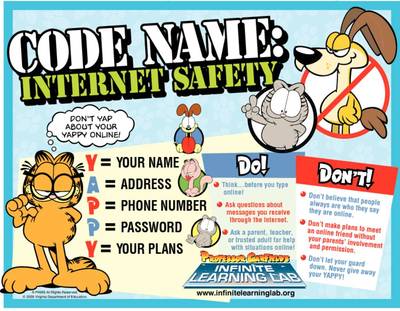
Below are links to cybersafety activites to be completed indivudally on a computer. Type in the web address to get them on your computer. Choose an activity and complete.
http://www.safeschoolshub.edu.au/for-students/2-4/find-out-about
https://www.esafety.gov.au/education-resources/classroom-resources
What ways could we use to help us remember to by safe online?
Great! Now let's get back to our task.... creating a class blog!
Why should we make a class blog?
What could we do with the blog? Who would read the blog? What could we share?
Write on the board all the things you would like to share on the blog.
Don't forget to consider CyberSafey.

Image from: http://www.clixmarketing.com/blog/2015/06/18/why-good-old-fashioned-brainstorming-is-important-in-ppc/
Did you come up with these few?
- to share what you are doing in class with family and friends
- to learn and practice online safety
- to learn how to use a new, online technology
Process
Step 1: Set up your blog
Step 2:Set up Pages
Step 3: Learn about Posts
Step 4: Publish first Posts
Step 5: Connect parents and friends to the Blog
Evaluation
Systems for contnuing to update the Blog
Teacher Page
What is this WebQuest about?
The WebQuest is a step-by-step procedure for creating a class blog. It uses the platform Kidblog to create the blog. Below is a link to the security settings and other important information about Kidblog.
http://kidblog.org/home/#why-kidblog
How can I use it?
This WebQuest has been designed for delivery to the whole class, while being actively lead by the classroom teacher. The resource is displayed on an interactive wideboard (or other large display) and the class read it through together and complete the activites along the way. The teahcer is the active leader of this process to access links and explore external reosurces on the WebQuest and ensure all students are engaged, following along and completing the activites.
There are 2 resources that will need to be printed: the individual and group booklets. The students will need access to computers and the internet when the groups are ready to create their post.
Where does it fit into the Australian Curriculum?
The resource is designed to facilitate the learning of two key Australian Curriciulum descriptors:
Years 3 and 4 / Digital Technologies Knowledge and Understanding / ACTDIK007
Identify and explore a range of digital systems with peripheral devices for different purposes, and transmit different types of data
Years 3 and 4 / Digital Technologies Processes and Production Skills / ACTDIP013
Plan, create and communicate ideas and information independently and with others, applying agreed ethical and social protocols
Specific links to the descriptors:
- considering ways of managing the use of social media to maintain privacy needs (ACTDIP013)
- using a range of online tools to share information and being aware that information may be received at different times (ACTDIP013)
- organising and creating different types of information for sharing and collaborating online (ACTDIP013)
- managing a project that involves students working together to publish online (ACTDIP013)
- discussing digital citizenship rules and behaviours for participating in an online environment (ACTDIP013)
- using specific peripheral devices to capture different types of data (ACTDIK007)
- recognising that images and music can be transferred from a mobile device to a computer (ACTDIK007)
Key Ideas of Technology
- Project managment
- Information and communiction capacity
- Safety
- Systems thinking
General Capabilities
- Literacy (communicating with class and using blog as a means of communication)
- Information, Communication and Technology (ICT) Capabilty
- Critical and Creative thinking (design aspects of the blog, what to include, systems to create and maintain and more)
- Personal and Social Capacity (collaboritve activity)
What is the Assessment?
The assessment for this unit is largely based on the collaboration of teams and the product (post) they produce at the end of the WebQuest. The rubric for marking this is found here:
Differentiation within the WebQuest