
Introduction
Your first assignment is to download or print off the Friendly Email Template at the bottom of the page and write back to Dr. Dino Sore. After you download the template, you will watch some movies to help you write back to him. After the movies you should be able to let him know:
(1) one thing that you learned,
(2) what you will do to make sure his museum is taken care of and
(3) wish him well on his trip!
Friendly Email Template (click here)
Task
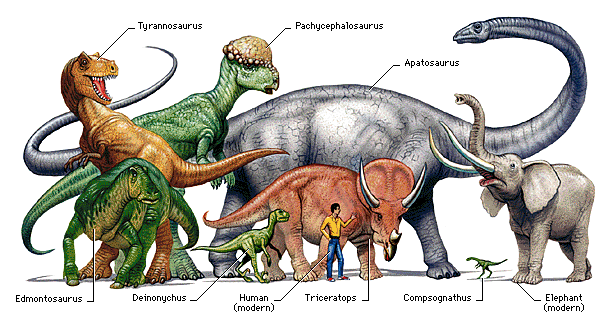
You will learn about one dinosaur and the time period in which it lived. You will then use differnt software to organize your facts and create a Dinosaur Museum Plaque!

1. First watch the Dinosaur Movie Clips (click here or on the movie icon)
2. Choose your own dinosaur to research.
3. Complete the Dinosaur Research Sheet on your dinosaur to show your expertise!
|
1. |
2. |
3. |
4. |
5. |
| 6. Barosaurus | 7. Brachiosaurus |
8. |
9. |
10. |
| 11. Compsognathus |
12. |
13. |
14. |
15. |
| 16. Edmontosaurus |
17. |
18. |
19. |
20. |
| 21. Ornithomimus |
22. |
23. |
24. |
25. |
|
26. |
27. |
28. |
29. |
30. |
Process
Review Knowledge of Dinosaurs
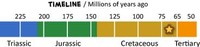
1. Interactive Dinosaur Timeline!
Learn more about the different dinosaur ages.
2. How to Find Dinosaur Fossils
Watch a clip video about how dinosaur fossils are found.(click here!)
3. Plaque
Create your Marymount Virtual Dinosaur Museum Plaque. Click on the link and follow the following steps. (click here!)
First, add your name to your plaque.
Second, attach a picture of your dinosaur to the plaque.
Third, write a 3 sentences or more paragraph on your dinosaur.
Fourth, fill in the facts on your dinosaur.
Fifth, write 2 - 3 sentences on your opinion of your dinosaur.
Extension Activities for Dinosaurs
1. Extension Activity
Play the Game: compare dinosaurs to objects! (click here!)
2. Picture of Your Dinosaur
Create a picture of your dinosaur using the Google Drive: Drawings Application (click here!)*
*When you finish the picture simply NAME and SAVE it .
Evaluation
|
Dinosaur WebQuest
Technology Skills: Rubric
Circle yes or no after reflecting on your technology skills and your work. Pass in the rubric to your teacher when you’re done. |
||