
Introduction
- Computer network specialists and computer systems administrators are responsible for the daily operations of an organization’s computer networks. They organize, install, and manage an organization’s computer systems, including local area networks (LANs), wide area networks (WANs), network segments, intranets, and other data communication systems.
- Network and computer systems administrators work with the physical computer networks of various organizations and therefore are employed in many industries.
- Network and computer systems administrators must often have a bachelor’s degree, along with related work experience.
- According to US News , the average salary for a computer systems administrator was $72,560 (U.S. dollars) in 2012.
In this webquest you will:
- Learn the terminology and components of a successful network
- Learn the advantages of using a network
- Describe the various network communications
- Recognize different ways to set up a network
- Differentiate between network designs
- Design a computer lab
- Troubleshoot common problems in a networked computer lab
Task
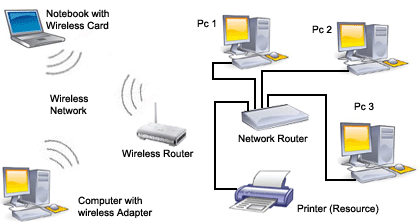
You are the director of the ITD department of the Rankin County School District. A new school is being built because of overcrowding at your current school. You are asked to design a network of computers to be used in the computer labs at the new school. Most of the programs to be used in the labs will come through the main server at the central office. The students in the new school must be able to login, save, and access information from any computer in the new school. (Just like you can do now through your H drive.) Teachers will use their laptops wirelessly. Student computers will be connected via Ethernet. You even have to design the computer lab because they trust your opinion so much!!
Task one:
Watch the video below:
http://www.youtube.com/watch?v=TVvEheZVwdg[video:http://www.youtube.com…]
This will help you learn:
- The purpose of a computer network
- The three types of computer networks
- At least one feature of each type of network
Task 2: Types of Network Layout (Topology)
In the next task you will watch a series of short videos to help you learn:
- The types of layouts of computer networks
- The physical appearance of the various network layouts
- [video:http://www.youtube.com/watch?v=kfEDPQAYH4k&feature=results_main&playnex…]
Process
You will need to determine which components will be required to make this work.
You will create a powerpoint or report that includes:
1. Terminology and components of a succesful network
2. Advantages and disadvantages of using a network
3. Different types of networks
4. A drawing of your computer lab
5. Common problems a networked computer lab may have
6. A list of the different types of network communications
Evaluation
Working in groups of two, you will be evaluated on the components of your paper.
1. I included terminology and components of a successful network within my paper so that the school board would know what I was talking about. They don't know as much as I do about computers so I need to give them specifics.
2. I told the school board about the advantages of using a network.
3. I told the school board about the different types of networks and the one I chose to use and why.
4. I showed the school board a drawing of my computer lab and why this layout was important.
5. I let the school board know of common problems a networked computer lab may have. Even though I know this is the best option, I wanted them to be aware of problems that they may run into.
6.I gave them a list of the different types of connections possible and the one I decided to use.
Teacher Page
Computer networks share common devices, functions, and features including servers, clients, transmission media, shared data, shared printers and other hardware and software resources, network interface card(NIC), local operating system(LOS), and the network operating system (NOS).
Some terms you may want to research in order to write a successful paper are:
- Server
- Clients
- Transmission Media
- Shared Data
- Shared Printers
- Network Interface Cards
- Local Operating Systems
- Network Operating Systems
- Hub
- Switch
- Router
- WAN
- LAN
http://www.ictgnvq.org.uk/ -This is a great website that may provide helpful information to complete this assignment.