
Introduction
Have you ever wondered how the computers you currently use daily were developed?
Technology has revolutionized the way we interact with the world and among its powerful innovations were computers. Throughout time, computers have significantly evolved to impact every aspect of human’s life. They have become an integral part of our daily life as they facilitate the accomplishment of complex tasks.

In this WebQuest, you will understand what a computer is, explore the key milestones in the evolution of computers through history and learn about the basic parts that constitute this device and how those parts come together to perform several missions.
Task

- Understand the historical milestones in the evolution of computers
- Define a computer
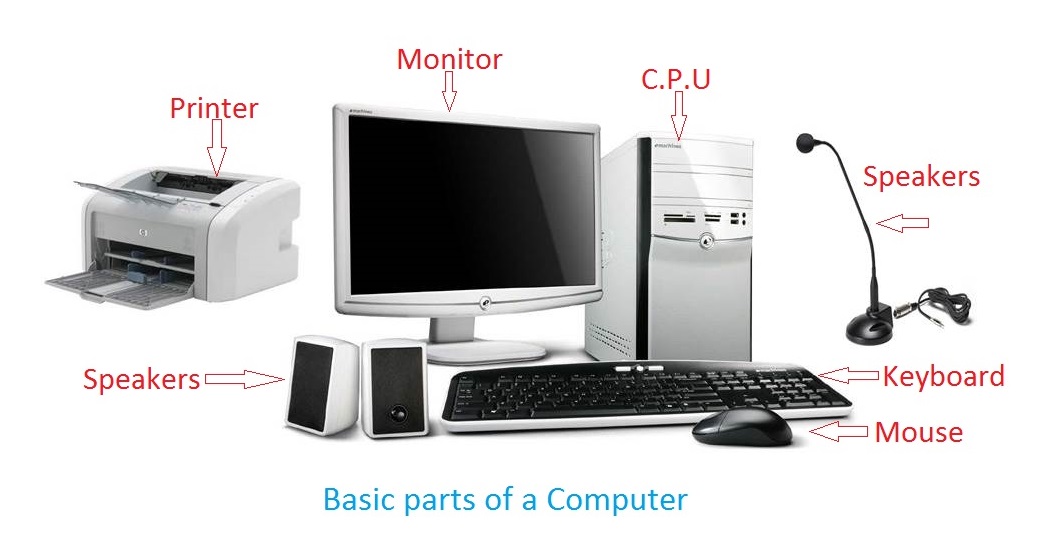
- Identify its fundamental components
- State the function of each component
- Create a PowerPoint presentation to showcase your findings
Your mission is to apply the knowledge you will gain in this learning journey through a PowerPoint presentation to be shared in class with your colleagues. Your presentation should consist of 5 slides that reflect your understanding of the topic. Slides should highlight: the pivotal historical events in the evolution of computers, 1-sentence definition of computer, its core parts, functions of different parts and a final slide containing any questions and inquiries that you had on this topic to be further discussed in class.
Process


- Start by reading this article to uncover the past and learn about the most significant events in the development of computers.
- Watch this video about remarkable individuals who contributed to the evolution of computers, so that you gain insight into the role of each inventor in transforming the world.
Activity: Close your eyes and imagine how a computer would look like in the near future based on what you have learned in this step. Be creative!

- Explore the definition of a computer by referring to this article.
- Different types of computers exit, to determine those types read in this article the section titled “What are the different types of computers?”
- Read the section “Computer Hardware and Software” of this article to differentiate between computer hardware and software.
-Watch this video to learn about the basic parts of a computer.

Activity: Search for picture of a computer part that used to be present in old computers and is absent in current devices.

-Check this website to understand the function of each part of a computer.
-Examine this graphical timeline that looks at the development of several essential parts of the computer leading to the device utilized nowadays.
Activity: Reflect on your use of computer; where do you mostly see yourself utilizing this device?
-Refer to this video to organize your research findings in a PowerPoint presentation.
-Choose a suitable title.
-Your presentation, made up of 5 slides, should include:
- The pivotal historical events in the evolution of computers
- Definition of computer summarized in 1-sentence
- Listing of the core parts of computer
- Functions of different parts stated briefly
- A final slide containing a question that you had on this topic to be further discussed in class
-Support your presentation with images and/or videos (at least 2).
-Be prepared to share your findings with your colleagues in 5 minutes.
Evaluation
This presentation is worth 16 points, which are distributed according to the following rubric:
| Criteria | Poor (1 points) | Satisfactory (2 points) | Good (3 points) | Excellent (4 points) |
| Content Accuracy | Inaccurate information | Some inaccuracies present | Accurate information with limited use of resources | Accurate information with sufficient use of resources |
| Organization | No clear organization | Difficult to follow | Generally clear but needs improvement | Clearly organized with logical flow of ideas |
| Visual Quality | Lacks images/videos/slide transitions | Limited use of images/videos/slide transitions to enhance understanding | Adequate use of images/videos/slide transitions to enhance understanding | Creative use of 2 or more appropriate images/videos/slide transitions |
| Presentation skills | Poor communication | Fluent, Lacks proper eye contact | Engaging, Fluent, Lacks proper eye contact | Engaging , Fluent, Maintains proper eye contact |
Total Score: /16
Conclusion
Congratulations! You have successfully completed your educational journey in the world of computers.
-Over decades, computers have become smaller in size but with greater impact in our lives.
-Computers are made up of a set of core components that allow it to function efficiently.
- Being an essential tool nowadays that can perform multiple tasks, acquiring knowledge on appropriate usage of computer is necessary.
To wrap up, here is a small quiz to test what you have learned:
Categorize the following computer parts in to input and output devices


Click here to check if you have successfully answered this question.
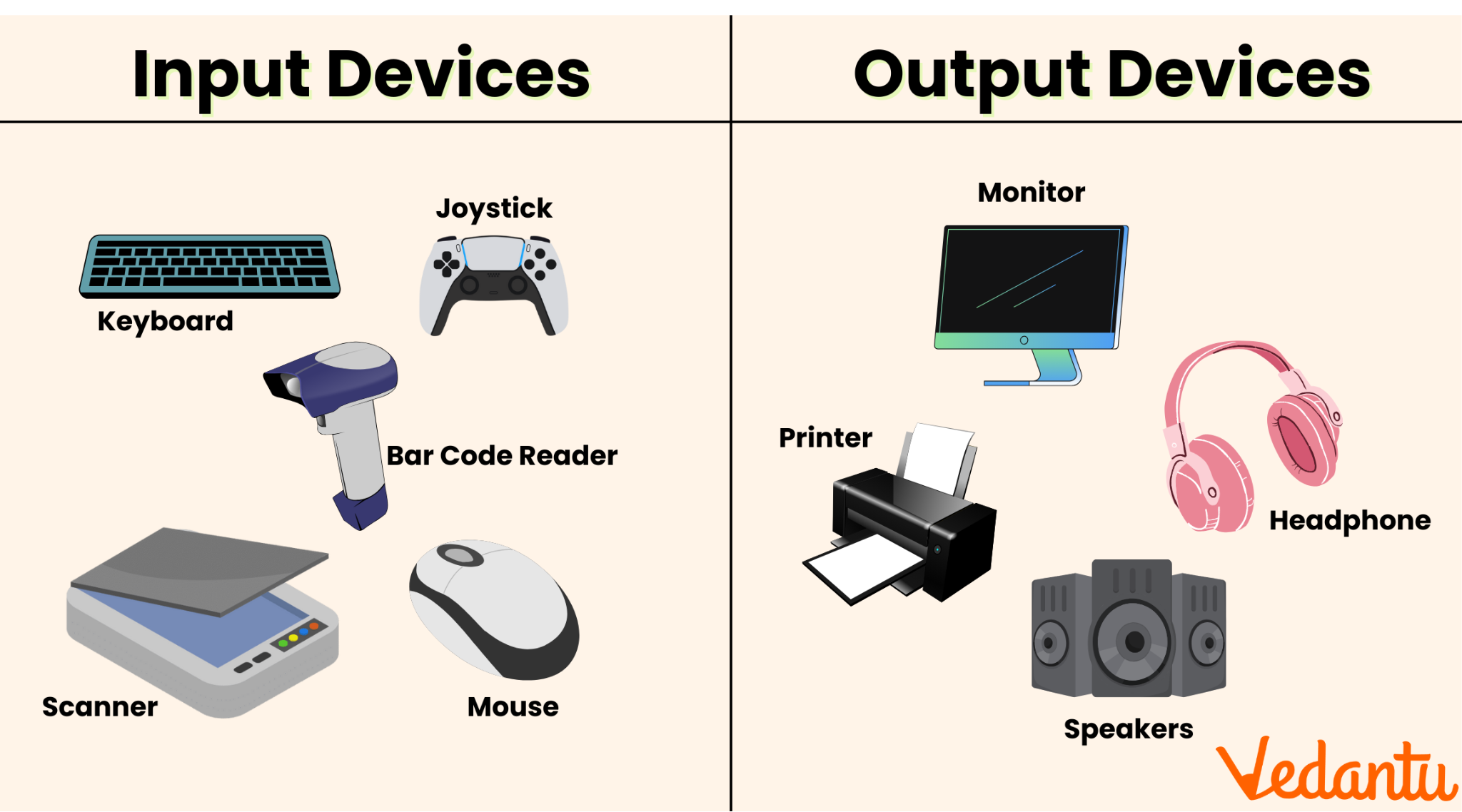
I hope that this activity would encourage you to further explore relevant topics based on the knowledge you have built today.
Credits
Computer History Timeline. (2020). Softschools.com. https://softschools.com/timelines/computer_history_timeline/20/
Educational Hub. (2023, January 31). How to Create a Powerpoint Presentation | a Beginner’s Guide. [Video]. YouTube. https://www.youtube.com/watch?v=79dDSMlblcY
Encyclo Capsule. (2024, March 19). Who Invented the First Computer? [Video]. Youtube. https://youtu.be/PgNj_Ucm2T4
GCF Global. (2019). Computer Basics: What is a Computer? GCFGlobal.org; GCFGlobal. https://edu.gcfglobal.org/en/computerbasics/what-is-a-computer/1/
LearnFree. (2020, December 3). Computer Basics: Basic Parts of a Computer. [Video]. Youtube. https://youtu.be/mLgTnkw558w
Rouse, M. (2020, March 30). What is a Computer? - Definition from Techopedia. Techopedia.com. https://www.techopedia.com/definition/4607/computer
Strydom, M. (2023, January 8). Parts of a Computer and Their Functions. Computer Info Bits. https://computerinfobits.com/parts-of-computer-and-their-functions/
Wallulis, K. (2018, March 13). A History Of Computers For Kids. Sciencing. https://www.sciencing.com/history-computers-kids-7982362/
Image References:
(2018). Kip McGrath Hunter. https://englishandmathstutors.com.au/fun-facts-computers/
(2025). Linkedin.com. https://www.linkedin.com/pulse/evolution-impact-modern-computer-technology-sudharsan-thangavel-bv95c
(2016). Medium. https://medium.com/@Taseer111/what-is-computer-ecc9105a8439
(2025). Informationq.com. https://informationq.com/wp-content/uploads/2013/10/Basic-parts-of-a-Computer.jpg
(2019). Shutterstock. https://www.shutterstock.com/image-vector/input-output-devices-on-white-background-1545816392
(2025). Vedantu.com. https://www.vedantu.com/seo/content-images/9658af56-19b0-44f8-ac3f-322499e6b321_1..png